How to share project context between Cursor and Claude Code with MCP
Cursor and Claude Code should share company facts, not identical instruction files. Keep tool-specific behavior local to each editor. Put architecture, decisions, ownership, runbooks, and project state in one shared knowledge layer, then connect both agents to that layer through the Model Context Protocol. MCP is an open standard for connecting AI applications to external systems, and its architecture defines hosts, clients, and servers so one knowledge source can serve any compliant client. You maintain the facts once instead of twice, and two capable agents stop working from different versions of the same company.
TL;DR
- Cursor and Claude Code should keep separate instruction files for tool behavior and share one retrieval layer for company facts.
- The Model Context Protocol (MCP) is an open standard, introduced by Anthropic in November 2024, that lets any compliant client connect to the same external knowledge source. The current specification revision is 2026-07-28.
- Duplicated instruction files drift as soon as a decision changes in one file and not the other. Both agents then follow their own file correctly and produce conflicting work.
- Cursor and Claude Code read different files. Cursor reads
.cursor/rules/*.mdcandAGENTS.mdand its documentation does not mentionCLAUDE.md. Claude Code readsCLAUDE.md, notAGENTS.md, and the documented fix is a one-line@AGENTS.mdimport insideCLAUDE.md. - MCP tool schemas cost context before you type. Measured per-tool schemas run 103 to 1,024 tokens each, with 20 to 30 registered tools consuming roughly 10,000 tokens, so keep the server count and tool count deliberate.
- Architecture, ownership, runbooks, decision rationale, and migration status belong in the shared layer, because changing any of them should affect every agent and every teammate at once.
- A read-only shared layer reduces duplicate investigation. A read-write layer lets validated findings compound into the next session.
- Falconer runs a hosted remote MCP server that Cursor, Claude Code, and other MCP clients read from and write back to, scoped to the signed-in user’s permissions.
Why do Cursor and Claude Code drift apart?
Cursor is an AI code editor that applies rules from .cursor/rules and AGENTS.md to the model’s context as you work. Claude Code is Anthropic’s command-line coding agent that loads CLAUDE.md as project memory at the start of a session. They can run the same underlying model and still read completely different instructions.
A typical team has:
- Cursor rules in one file
- Claude Code instructions in another
- Architecture notes in Notion
- Implementation details in GitHub
- Decisions in Slack
- Project status in Linear
Each source can be accurate on its own. Together they create a maintenance problem.
A decision changes. The Claude Code instructions get updated. The Cursor rules do not. Both agents follow their instructions correctly and still produce conflicting work. Nobody did anything wrong, and the output is still wrong.
The repair is a clean separation between local behavior and shared knowledge.
What should stay local to each tool?
Local instructions control how an agent works in a specific environment. Keep these in Cursor or Claude Code:
- Formatting preferences
- Commands and build conventions
- Coding standards
- Agent permissions
- Tool-specific workflows
- Rules for running tests
- Instructions for reviewing changes
A repository-level CLAUDE.md is the canonical place for stable project instructions like build commands, directory structure, and coding conventions. Claude Code loads it as project memory, alongside path-scoped rules for narrower cases.
Cursor holds the equivalent in rules, and the documented precedence is Team Rules, then Project Rules, then User Rules, with the earlier source winning a conflict. Project rules live in .cursor/rules/*.mdc, and a .md file without frontmatter is ignored. Cursor also reads AGENTS.md, a tool-neutral instruction file, in the project root or in nested subdirectories.
These rules can differ between tools, and that is fine. Cursor and Claude Code have different interfaces, context strategies, and tool surfaces even when they run the same underlying model. Our guide on giving Claude Code context covers where each type of instruction lives.
How do you keep the two instruction files from diverging?
For the subset of behavior that should be identical in both tools, do not maintain two copies. Cursor reads AGENTS.md. Claude Code does not, and its documentation says so directly, along with the supported workaround: write the shared conventions once in AGENTS.md, then import that file from CLAUDE.md.
@AGENTS.md
## Claude Code
Use plan mode for changes under `src/billing/`.
Claude Code loads the imported file at session start and appends anything you add below it, so one file carries the shared conventions and the other carries the Claude-specific behavior. A symlink works too, if you have nothing tool-specific to add:
ln -s AGENTS.md CLAUDE.mdOn Windows, creating a symlink requires Administrator privileges or Developer Mode, so prefer the @AGENTS.md import there. Run /context afterward and confirm CLAUDE.md appears under Memory files.
Two more commands are worth knowing if you are consolidating an existing setup. /init reads Cursor rules in .cursor/rules/ or .cursorrules and Copilot rules in .github/copilot-instructions.md and folds the relevant parts into a generated CLAUDE.md. /import brings a supported agent’s configuration across, including MCP servers, commands, subagents, and skills, which requires Claude Code v2.1.213 or later.
This solves duplication for instructions that live in the repository. It does nothing for facts that live outside it.
What belongs in the shared knowledge layer?
Shared context describes the system, not the agent. Store these once:
- Architecture and service boundaries
- Product behavior
- Ownership
- Runbooks
- Current project state
- Cross-repository dependencies
- Architecture decisions and the rationale behind them
- Known failure modes
- Compliance constraints
- Rejected approaches
- Migration status
None of these facts should change depending on which coding agent reads them.
The test for where a fact belongs
A useful test: if changing this information should affect every agent and every teammate, it belongs in the shared layer.
The four layers, and what each one is for
Most teams treat this as a two-way choice between rules files and a retrieval layer. There are really four places context can live, and each has a job the others do badly.
| Layer | Where it lives | Reads it | Best for | Fails at |
|---|---|---|---|---|
| Cursor rules | .cursor/rules/*.mdc, plus Team and User Rules |
Cursor only | Cursor-specific behavior, file-scoped conventions | Anything Claude Code also needs |
| Claude Code memory | CLAUDE.md in the repo, plus path-scoped files |
Claude Code only | Build commands, directory structure, test conventions | Anything Cursor also needs |
| Tool-neutral repo instructions | AGENTS.md in the root or a subdirectory |
Cursor, Codex, Copilot, and other agents that support it. Claude Code only if CLAUDE.md imports it |
Conventions every agent in the repo should follow | Facts that live outside the repo, and facts that change faster than the repo |
| Shared retrieval layer | An MCP server both clients connect to | Any MCP client | Architecture, decisions, ownership, runbooks, cross-repo dependencies | Tool-specific behavior, which does not belong here |
The first three are files in a repository. They are the right home for behavior and for conventions that travel with the code. The fourth is the only one that can hold a fact that changes independently of any single repository, and the only one where updating once updates every agent and every teammate at the same time.
Local versus shared context at a glance
| Context type | Where it lives | Who it serves | What happens when it changes |
|---|---|---|---|
| Build and test commands | CLAUDE.md, Cursor rules |
One tool, one repo | Update the local file |
| Formatting and code style | CLAUDE.md, Cursor rules |
One tool, one repo | Update the local file |
| Agent permissions | Local tool config | One tool | Update the local file |
| Repo-wide conventions | AGENTS.md |
Every agent that reads it, one repo | Update the file, commit it |
| Architecture and service boundaries | Shared layer over MCP | Every agent and teammate | Update once, everyone reads the new version |
| Decision records and rejected approaches | Shared layer over MCP | Every agent and teammate | Update once, history preserved |
| Ownership and escalation | Shared layer over MCP | Every agent and teammate | Update once |
| Runbooks and migration status | Shared layer over MCP | Every agent and teammate | Update once |
How does MCP let both agents read the same source?
MCP gives Cursor and Claude Code a standard connection to one knowledge source. The protocol architecture defines hosts, clients, and servers, so a single server can serve any compliant client. That list is not limited to two editors. VS Code, OpenAI’s Codex, and ChatGPT speak the same protocol, and the current specification revision is dated 2026-07-28.
How the pieces connect
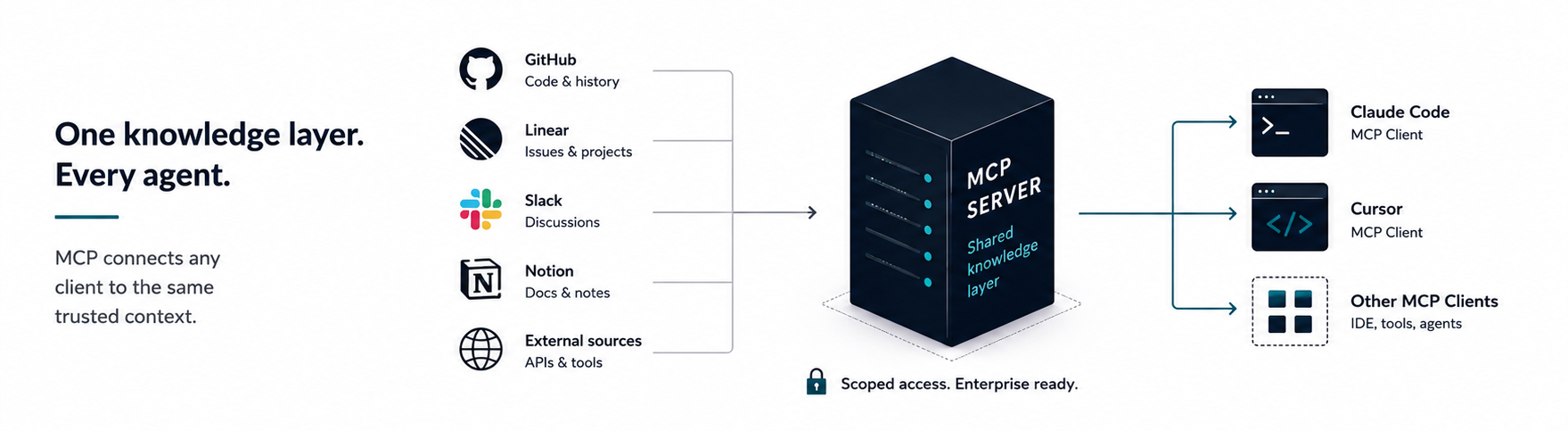
Each agent keeps its own operating instructions. Both retrieve company context from the same place.
The five-step write-back loop
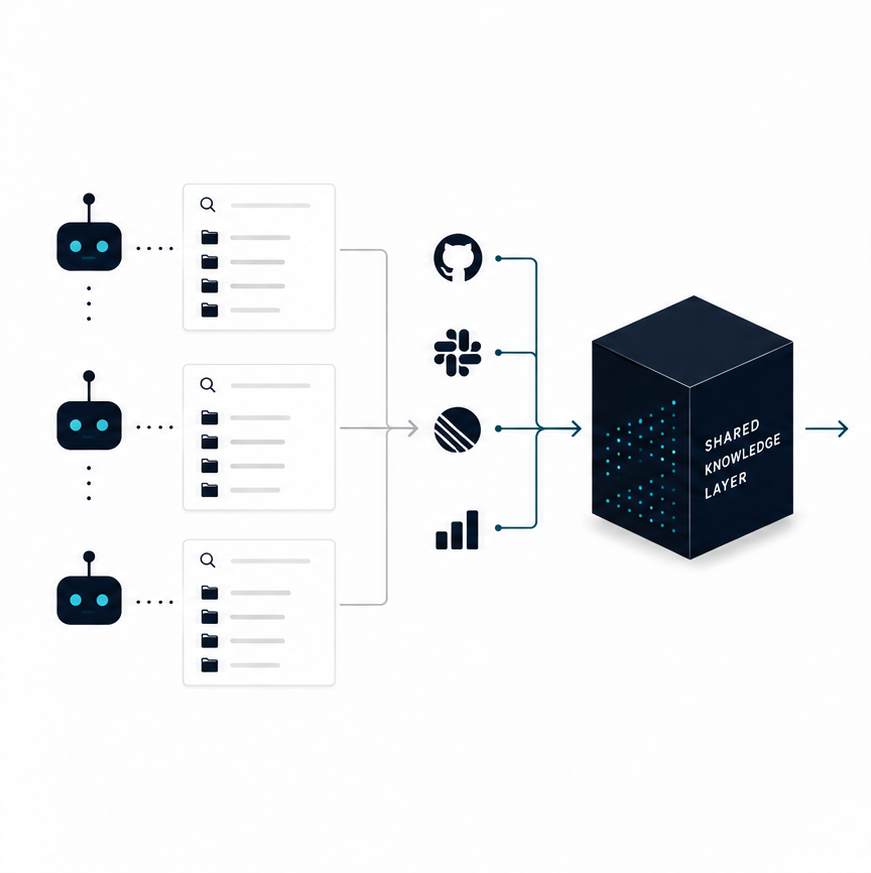
The strongest version of this is read-write:
- The agent retrieves relevant knowledge.
- It investigates the code.
- It validates its conclusion.
- It writes the durable finding back.
- The next agent starts from that finding.
Falconer is a knowledge agent for engineering teams that writes and updates docs as your code changes. It connects code, tickets, docs, Slack threads, PRs, and team history into one engineering context layer, and lets Slack, the editor, Claude, Cursor, and command-line agents read from and write back to it. Answers include citations, so a reviewer can check where a conclusion came from. Skill documents are the shared-instruction version of the same idea.
What does a shared MCP server cost you in context?
Every connected MCP server spends context window before the user types anything, because each tool’s schema is loaded into the prompt. This is the part of the setup most guides skip.
Measurements from a production Claude Code plugin, reported in the MCP repository in May 2026, put individual tool schemas between 103 and 1,024 tokens, with the heaviest tools costing roughly ten times the lightest. Across 20 to 30 registered tools, schemas occupied 15 to 30 KB of context, or about 10,000 tokens, before the first user message. Over 2,600 production conversations the first-turn schema cost ran about $0.15 per conversation uncached and closer to $0.04 with a 75% prompt cache hit rate.
The dollar figure is small. The context is what hurts, because tokens spent on tool definitions are tokens unavailable for reasoning about your code.
What that means for this setup:
- Connect few servers, not many. One shared knowledge server beats five overlapping ones.
- Audit total tool-schema overhead, not just server count. One focused server can use less context than several overlapping servers, but a broad server can still load dozens of tool schemas before the first prompt.
- Retrieval you pay for once beats investigation you pay for every session. An agent that reads the current retry policy in one call is cheaper than an agent that rediscovers it by reading the billing service, which is the same argument we make about agents burning tokens hunting for answers.
How do you connect Claude Code to Falconer over MCP?
Falconer provides a hosted remote MCP server for Cursor, Claude Code, and other MCP clients. Authentication runs in the browser on first connection. Claude Code supports remote HTTP servers with a user, project, or local scope: local is the default and applies to the current project only, project writes to a .mcp.json file you commit so the team shares it, and user makes the server available across all your projects.
Run:
claude mcp add --transport http --scope user \ --client-id falconer-claude-code --callback-port 49152 \ "falconer" "https://falconer.com/api/mcp"Then open Claude Code and run:
/mcpComplete the Falconer sign-in flow in your browser. If the callback port is already taken, pick another local port and run the command again.
Use --scope project instead if you want the server committed to the repository for everyone. Claude Code prompts each teammate for approval the first time a project-scoped server is used, which is the behavior you want on a shared machine.
How do you connect Cursor to Falconer over MCP?
Create or update .cursor/mcp.json in your project:
{ "mcpServers": { "Falconer": { "type": "http", "url": "https://falconer.com/api/mcp" } }}Open Cursor’s MCP settings, find Falconer, and select Login to finish authentication. A project-level .cursor/mcp.json applies to that repository; ~/.cursor/mcp.json applies globally. The Falconer MCP guide has the full setup, including what each tool exposes.
How do you verify both tools are reading the same context?
Do not assume a green connection indicator means shared context. Test it end to end in four steps.
- In Claude Code, ask Falconer to write a small, checkable fact: the owning team for one service, or the current state of one migration.
- Confirm the write landed. Search for it in the Falconer web app.
- In Cursor, start a new chat in the same repository and ask the question that fact answers. The answer should come back with a citation pointing at the document you just wrote.
- Reverse the direction. Write from Cursor, read from Claude Code.
If step three returns an answer without a citation, the agent answered from the code or from its own priors rather than from the shared layer, and your retrieval prompt needs to be more explicit. The next section covers that.
Check the local layer separately. In Claude Code, /context lists which files actually loaded under Memory files, which is the fastest way to catch a CLAUDE.md that is sitting in a directory the session never reads.
Why isn’t my MCP server showing up in Cursor or Claude Code?
The most common failure has nothing to do with the server. Either the client never connected, or it connected and nobody finished authenticating it.
In Claude Code, run /mcp. The panel reports one of four states per server: ✔ Connected, ! Needs authentication, ✘ Failed to connect with an HTTP status, or ⏸ Pending approval for a project-scoped server waiting on your consent. claude mcp list and claude mcp get falconer give the same information from the shell, and claude mcp login falconer re-runs authentication.
In Cursor, open the Output panel (Cmd+Shift+U or Ctrl+Shift+U) and select MCP Logs from the dropdown. The logs show server initialization, tool calls, and error messages.
Work through these in order:
| Symptom | Likely cause | Fix |
|---|---|---|
| Server absent from the list | Config in the wrong file | Project config is .cursor/mcp.json or .mcp.json; global is ~/.cursor/mcp.json or user scope |
Needs authentication |
OAuth never completed | Run /mcp in Claude Code, or select Login in Cursor’s MCP settings |
| Sign-in never returns | Callback port already in use | Re-run claude mcp add with a different --callback-port |
Pending approval |
Project-scoped server awaiting consent | Approve on first use; claude mcp reset-project-choices clears earlier answers |
| Connected but tools never fire | Agent has no reason to call them | Make retrieval an explicit instruction, as below |
How do you make an agent retrieve context before it writes code?
Do not wait for the agent to notice that it is missing company context. Make retrieval part of the task.
Use a prompt like this one:
Before changing the billing retry logic, ask Falconer for:
1. The current retry policy2. The decision that established it3. Related incidents4. The owning team5. The canonical runbook
Cite the supporting sources. Flag any conflict or uncertainty before editing code.
That forces the agent to establish the current constraints before it forms an implementation plan. Use the same prompt in Cursor and Claude Code. Both agents can retrieve the same underlying answer even when they execute the task differently. This is the difference between prompt engineering and context engineering: the prompt is the same, and the retrieved context is what makes the answer correct.
Worth saving as a reusable prompt. Put a version of it in the AGENTS.md at your repo root so every agent that reads that file inherits the retrieval step, and keep a longer version in your shared layer as a document both tools can pull.
We keep a longer version of this prompt, plus a one-page checklist for deciding which of the four layers a given fact belongs in, in our context placement checklist. Copy it into your repo and cut it down to the facts your team actually argues about.
What should agents write back?
Reading shared context reduces duplicate investigation. Writing validated findings back lets the knowledge compound.
Save:
- Confirmed architecture relationships
- Debugging conclusions
- Current ownership
- Reasons behind unusual constraints
- Dependencies that are easy to miss
- Migration requirements
- Links to canonical sources
Do not save:
- Raw search output
- Temporary hypotheses
- Full transcripts
- Unverified conclusions
- File paths without explanation
Preserving everything the agent saw is not the goal. Preserve the conclusion another person or agent would otherwise have to reconstruct. Falconer MCP supports reading, searching, creating, and editing shared documents, and keeps revision history, so work written back becomes versioned and searchable instead of dying inside one chat session.
How do you control access when both agents share one source?
A shared context layer should not hand every agent every document.
Falconer MCP runs on the authenticated user’s permissions, and the security model is explicit that only resources a user already has access to appear in their responses. Access is selective at the repository, channel, and document level, so you choose exactly what Falconer can read in the first place. Falconer is SOC 2 Type II certified, encrypts data at rest with AES-256 and in transit with TLS 1.2 or higher, and offers self-hosted deployments for teams with stricter requirements. Access control stays attached to the knowledge itself instead of being copied into separate agent files, which is the same argument we make in build versus buy for a company brain.
There is a second access question that most write-ups skip: a committed MCP config is code your teammates execute. Claude Code treats it that way. A project-scoped server in .mcp.json sits at ⏸ Pending approval until the developer approves it, claude mcp reset-project-choices clears those answers, and --strict-mcp-config ignores everything except the config you pass explicitly. Review a shared server config the way you would review a dependency.
Apply the same principle to writes:
- Let agents read broadly enough to finish the task.
- Limit writes to appropriate documents.
- Review changes to high-risk runbooks, policies, and architecture records.
- Keep provenance attached to durable conclusions.
What goes wrong with the common approaches?
| Approach | Strength | Failure mode | Use it for |
|---|---|---|---|
| Separate context files per tool | Fast to start | Copies drift the moment a fact changes | Tool-specific behavior only |
| One giant shared instruction file | Portable across tools | Every agent gets irrelevant context, and the file gets hard to maintain | Small repos with stable conventions |
Symlinking CLAUDE.md to AGENTS.md |
Two files stay byte-identical for free | Only works when the content genuinely should be identical, and does nothing for facts outside the repo | Teams whose per-tool behavior really is the same |
| Read-only shared retrieval layer | Both agents start from the same facts | New findings vanish into chat sessions | Teams that cannot yet approve agent writes |
| Read-write shared retrieval layer | Verified conclusions compound across tools | Requires review, permission design, and context budget | Teams running more than one agent daily |
Separate files are still correct for behavior. They are the wrong home for facts about the system.
Where to start
If you are setting this up now, connect both tools to the same MCP server before adding more shared facts to either rules file. Start with the Falconer MCP guide, or see which docs platforms work with MCP and coding agents if you are still choosing a shared layer.
FAQ
Can I just keep one shared rules file for Cursor and Claude Code instead of two?
You can, and it works until the file grows. A single file sends both agents context they do not need for the current task, and it still does not solve the underlying problem, which is that company facts live outside the repo. Keep tool behavior in each tool’s own file and move architecture, ownership, and decisions into a retrieval layer both agents query through MCP.
Does AGENTS.md override .cursor/rules when both are present in the same repository?
No. Cursor’s documented precedence is Team Rules, then Project Rules, then User Rules, with the earlier source winning on conflict, and AGENTS.md is positioned as an alternative to .cursor/rules for straightforward cases rather than an override of it. Cursor reads AGENTS.md in the project root and in nested subdirectories. Rather than tuning precedence between two files that describe the same facts, keep each file scoped to behavior for its own tool and let both agents fetch shared facts over MCP.
Does Cursor read CLAUDE.md?
As of September 2026, Cursor’s rules documentation lists Project Rules in .cursor/rules, AGENTS.md, User Rules, and Team Rules, and does not mention CLAUDE.md. Several third-party guides assert that Cursor loads it unconditionally. Treat it as unsupported unless you have verified it in your own build, and do not rely on CLAUDE.md to carry facts you need Cursor to know.
Should I symlink CLAUDE.md to AGENTS.md so my tools stay in sync?
Yes for the narrow case where the content genuinely should be identical, and ln -s AGENTS.md CLAUDE.md is documented as supported. On Windows it requires Administrator privileges or Developer Mode, so use the @AGENTS.md import inside CLAUDE.md instead, which also lets you add Claude-specific instructions below the import. Neither approach helps with facts that live outside the repository. Falconer handles that problem by serving one knowledge source to every MCP client.
Does Claude Code read AGENTS.md?
No. Claude Code reads CLAUDE.md, not AGENTS.md. If your repo already has an AGENTS.md for Cursor, Codex, or Copilot, add a CLAUDE.md whose first line is @AGENTS.md and both tools read the same instructions without a second copy.
How do I stop CLAUDE.md from going stale when the agent keeps following rules that no longer match the code?
Stale instructions are a maintenance problem, not a prompting problem. Move anything that changes with the system into a layer that updates when the system does. Falconer writes and updates docs as the codebase changes, so the agent retrieves the current version instead of a file somebody last edited two quarters ago.
How do I move project context between Cursor, Claude Code, and Codex without re-explaining the repo every time?
Put the context in an MCP server rather than in any one client. All three are MCP clients, so they can query the same server and get the same answer. With Falconer connected, a new tool inherits the team’s accumulated context on its first session.
How does this work across a monorepo or several repositories?
Cross-repository dependencies are exactly the kind of fact that no single repo’s instruction file can hold correctly. Store them once in the shared layer and let each agent retrieve the relationships that matter for the change it is making. Falconer searches across connected repositories, so agents can retrieve documented or code-backed cross-repository relationships. Keep per-package conventions in nested AGENTS.md files, which Cursor reads in subdirectories.
How many tokens does connecting an MCP server cost?
Enough to budget for. Measured tool schemas run 103 to 1,024 tokens each, and 20 to 30 registered tools take roughly 10,000 tokens of context before the first user message. Connect one shared knowledge server with a small tool surface rather than several overlapping servers.
Can Cursor and Claude Code write back to the same knowledge source, or only read from it?
Both can write, if the server supports it and your permissions allow it. Falconer MCP supports reading, searching, creating, and editing documents, and keeps document revision history so reviewers can inspect and restore changes.
Ready to get started?
Create an account and start building your knowledge base — no contracts or credit card required. Or, contact us to design a custom package for your team.
Ready to get started?
Create an account and start building your knowledge base — no contracts or credit card required. Or, contact us to design a custom package for your team.