What are agent loops?
A guide to how AI agents actually run, why they fail, and what makes one work.
An agent loop is the cycle an AI agent runs through to complete a task: think, act, observe, repeat. It looks simple on a whiteboard and gets expensive in production. Most agent failures (wrong answers, runaway costs, infinite retries) trace back to something going wrong inside the loop, not the model.
It’s also the unit of work that practitioners like Andrej Karpathy, Boris Cherny (head of Claude Code), and Peter Steinberger (creator of OpenClaw) keep pointing at when they say the job has shifted from prompt design to loop design. This guide explains what the loop is, the parts that compose it, where it breaks, and what separates a loop that finishes in two turns from one that burns 80,000 tokens to write a 400-token answer.
TLDR
- An agent loop is the repeating cycle of thought, tool call, and observation that an AI agent runs until it hits an answer or a stop condition.
- The dominant pattern is ReAct (reason, act, observe, reason again), introduced by Yao et al. in 2022. Every modern agent framework is a variation on it.
- Practitioners like Andrej Karpathy, Boris Cherny, and Peter Steinberger have shifted the framing from “prompt engineering” to “loop engineering” — the unit of work is the loop, not the prompt.
- Loops fail in three ways: they don’t terminate, they thrash on bad context, or they drift off the goal.
- Loop length, not model choice, is usually what determines cost and latency. A 10-turn loop can send roughly 50x the tokens of a single linear call.
- The single biggest lever on loop quality is what the agent reads on its first retrieval. Good context ends the loop in one or two turns. Bad context stretches it to six or more.
What is the basic shape of an agent loop?
Strip away the framework code and every agent loop is the same four steps:
- Receive a goal. A user query, a triggered event, or a parent agent’s instruction.
- Reason. The model decides what to do next: call a tool, ask a clarifying question, or produce a final answer.
- Act. If the model picks a tool, the framework executes it (search, file read, API call, code run) and returns the result.
- Observe and repeat. The result gets appended to the conversation. The model reads the new state and decides what to do next. Loop until the model emits a final answer or hits a stop condition.
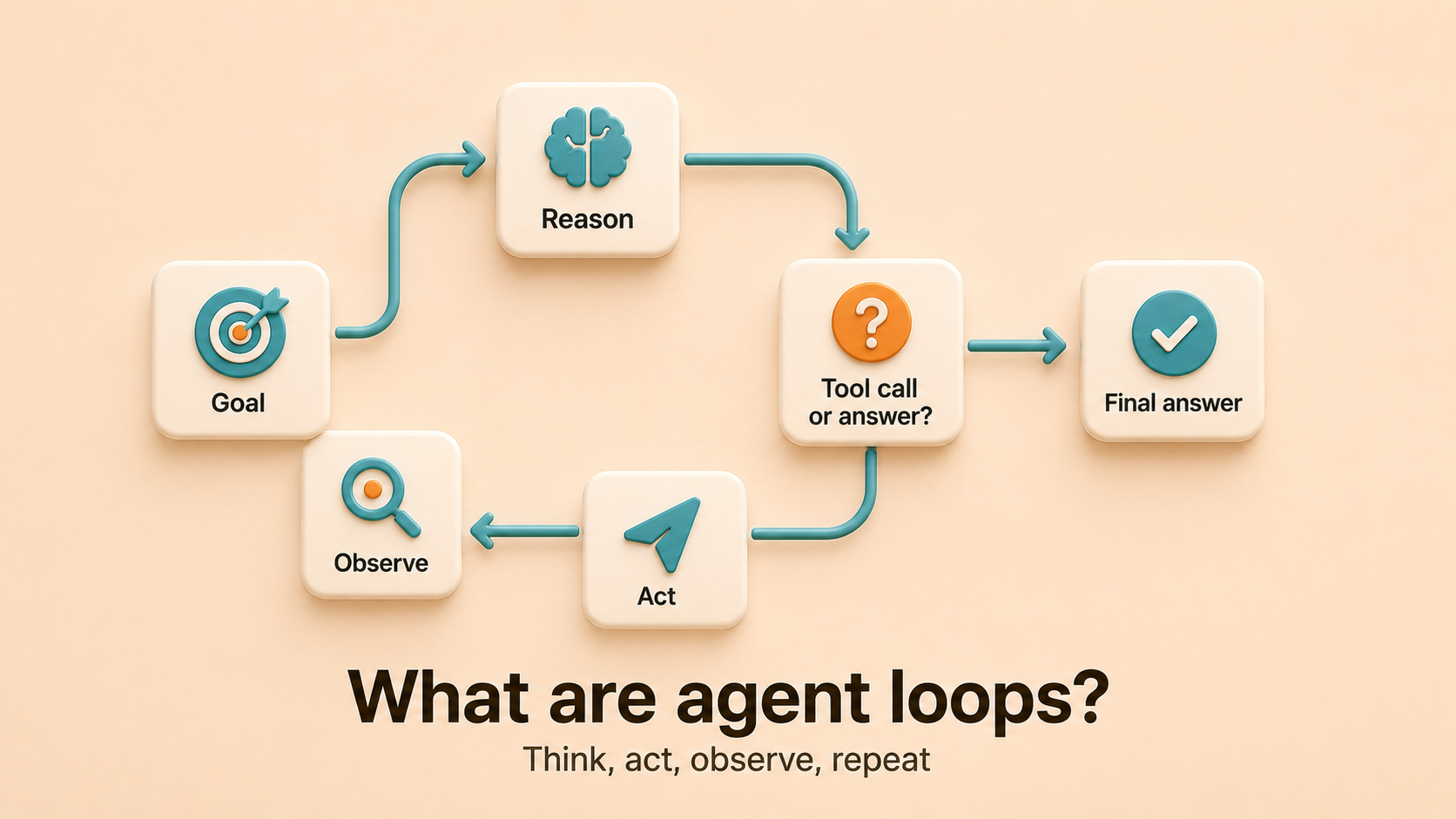
Everything else (memory systems, planners, sub-agents, scratchpads) is a refinement of this core cycle.
What is the ReAct pattern?
The dominant agent loop pattern is ReAct, short for “reasoning and acting,” introduced by Yao et al. in 2022. ReAct structures each turn as a thought, an action (tool call), and an observation (tool result). Each turn looks like this:
Thought: I need to find the user's last invoice.Action: search_invoices(user_id="u_123")Observation: [{id: "inv_889", date: "2026-05-12", total: 240}]Thought: I have the invoice. The user asked for the total.Action: respond("Your last invoice was $240 on May 12.")ReAct works because each action is grounded in the previous observation, and each thought is grounded in the previous action’s result. The model isn’t free-styling; it’s reading evidence and choosing a next move.
Most agent frameworks (Vercel AI SDK, LangGraph, OpenAI Agents SDK, Mastra) are ReAct loops with extra machinery on top: tool routing, structured outputs, retries, parallel tool calls.
Who is shaping how engineers think about agent loops?
The academic origin is ReAct, but three practitioners have driven how engineers actually talk about loops in 2026.
Andrej Karpathy is the most-cited voice on what he calls the “loopy era” of AI engineering. His AutoResearch project is a 630-line Python script that ran 50 ML experiments overnight on a single GPU, with the agent modifying training code, running it, checking results, and iterating without a human in the loop. The pattern generalizes far beyond ML training and is the clearest public example of what a long-running agent loop with a real goal actually looks like.
Boris Cherny, head of Claude Code at Anthropic, popularized the phrase “I don’t prompt Claude anymore. I have loops running that prompt Claude” in late 2025. Cherny built Claude Code as a side project in September 2024, and his framing reset how engineering teams think about the work: the unit of effort moves from writing a good prompt to designing a loop that keeps the agent on track until the goal is met. “Loop engineering” entered the vocabulary on the back of his talks.
Peter Steinberger, creator of OpenClaw and now at OpenAI, has been the loudest public voice on what loops cost when you don’t watch them. He posted a screenshot of a $20,000-a-day token bill (his employer’s, footed by OpenAI) that made the rounds in mid-2026 and called overnight agent loops like Ralph “the ultimate token burn machine.” His monthly reminder on X — “you shouldn’t be prompting coding agents anymore. You should be designing loops that prompt your agents” — captures the shift in workflow without sugar-coating the bill.
The throughline across the three is consistent: the work is no longer prompt design. It’s loop design. Everything else in this guide is mechanics on top of that frame.
Anatomy of a loop turn
Every turn the agent sends a payload to the model. Three things ride along, and each one has cost implications.
| Part of the payload | What it is | Why it grows |
|---|---|---|
| Conversation history | Every prior thought, action, and observation | Frameworks resend the full thread by default |
| Tool definitions | Schemas for every tool the agent might call | Most agents ship every tool every turn |
| Retrieved context | Documents, code, tickets pulled by tools mid-loop | More turns means more retrievals stacked in context |
By turn ten of a naive loop, you’re paying for ten copies of the original context plus every tool result so far. Input tokens, not output, dominate the bill.
How do agent loops fail in production?
Three failure modes. Knowing which one you have is most of the fix.
1. The loop doesn’t terminate
The agent keeps calling tools forever because nothing forces it to stop. It was almost done at turn 8, decided to “double-check,” went down a side path at turn 12, and is now at turn 40 with no clear exit.
Every production agent needs a hard turn budget. In the Vercel AI SDK that’s stopWhen: stepCountIs(N) (the default is 20). Without one, a loop is a billing event with no upper bound.
2. The loop thrashes on bad context
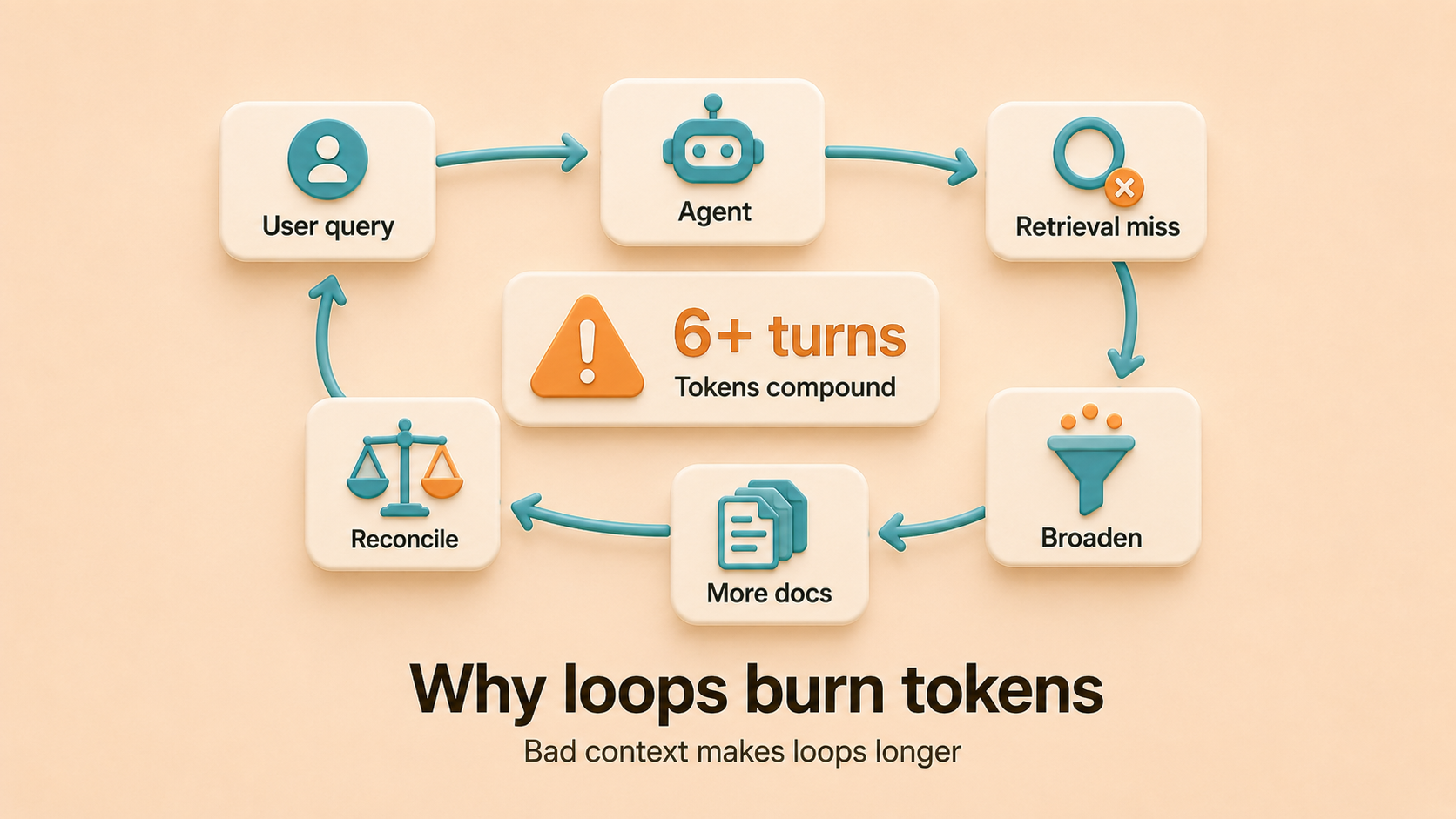
The agent’s first retrieval misses or returns stale information. Instead of stopping, it broadens the query, pulls more docs, finds contradictions, and asks the model to reconcile them in-prompt. Every retry is well-formed and looks healthy in your observability tool. The signal is hidden in token-per-turn growth across the middle of a single trace.
This is the most expensive failure mode and the hardest to see. (For a deeper breakdown of the cost mechanics, see Why your AI agents burn tokens hunting for answers they should already have.)
flowchart LR
    Q["User query"] --> A["Agent"]
    A --> M1["Retrieval miss"]
    M1 --> M2["Broaden query"]
    M2 --> M3["Pull more docs"]
    M3 --> M4["Reconcile<br/>contradictions"]
    M4 -->|"loop 6+ turns"| A
3. The loop drifts off the goal
Long ReAct chains lose the plot. The model starts solving an adjacent problem because the original goal is buried 30 turns up the conversation, in the part of the context window where attention is weakest. This is the “lost in the middle” problem documented by Liu et al. in 2023: language models attend most strongly to the beginning and end of their context window, and least strongly to the middle.
The fix is a scratchpad. Manus, an autonomous AI agent platform, published the recitation pattern: have the agent rewrite the goal and current progress at the end of context every turn (typically as a todo.md). This pushes the plan into the model’s strongest attention span.
Why does first-retrieval quality determine loop cost?
You can prune history, scope tools, cache prefixes, and set a turn budget. All of those help. But the variable that swings loop length the most is whether the agent’s first retrieval is correct.
Microsoft Research measured up to 30x variance in total tokens across unconstrained coding agents on the same task. Almost all of that variance is path-dependent: agents that read clean, current context finish in one or two turns. Agents thrashing across stale sources finish in six or more.
Three things make first retrieval go wrong:
- Stale docs. They look identical to current docs in the response. The agent reads, acts, fails, retries.
- Scattered sources. The answer is in code, but the agent searched docs first. Or in a Slack thread the index hasn’t refreshed. Or in a closed ticket nobody thought to reopen.
- Unresolved contradictions. The June doc says one thing, the November Slack thread says another, the current code says a third. The agent has to reconcile in-prompt, which is expensive and unreliable.
What does a healthy agent loop look like?
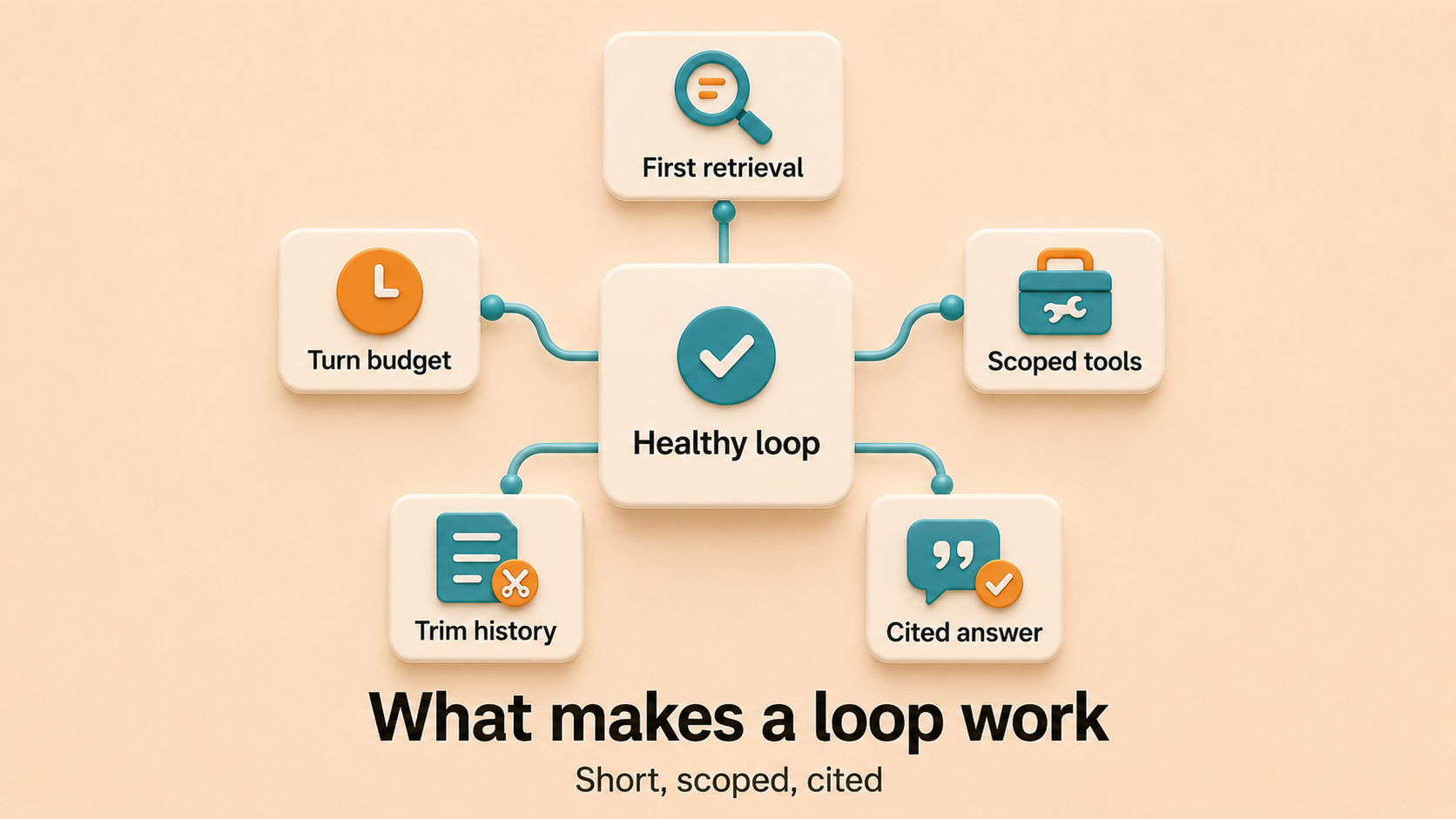
A healthy agent loop on a routine task has these properties:
- Short. Two to four turns for most read-heavy questions, more only when the task genuinely requires it.
- Flat tokens per turn. History pruning is doing its job; tool observations are getting cleared once consumed.
- Scoped tools. The agent ships only the schemas relevant to the current task, not all 47 it might use someday.
- Hard ceiling. A
stopWhen(or framework equivalent) that fails fast and surfaces to a human when stuck. - Cited answers. The final response points at the sources it used, so a human can verify without re-running the loop.
If your loops don’t look like this, the next section names the levers in order of impact.
What are the five biggest levers for reducing agent loop cost?
- Fix the first retrieval. The biggest single lever. If the agent reads a current, consolidated answer on turn one, every other optimization compounds. If it doesn’t, every other optimization is just making a broken loop cheaper.
- Set a hard turn budget. Cheapest fix. Inject a “wrap up” warning a few steps before the cap so the agent consolidates instead of getting cut off mid-thought.
- Scope tools to the task. Cut the schemas in your prompt down to what the current task actually needs. One audit cut tool count from 47 to 4 and dropped average input tokens per turn by 22% with no other changes.
- Prune and summarize history. Drop middle turns once they’ve been absorbed. Summarize older spans into a structured block that preserves what was tried and what failed (not just user-visible content), or the agent re-tries failed approaches.
- Cache stable prefixes. Anthropic and OpenAI both support prompt caching. It reduces the unit cost of tokens you send. It does not change how many tokens you need to send. Treat it as a multiplier on the other fixes, not a fix itself.
Which agent framework should you use?
Pick the framework based on what you need control over. All four implement some variant of the ReAct loop; the differences are in the surrounding machinery.
| Framework | Language | Strength | When to reach for it |
|---|---|---|---|
| Vercel AI SDK | TypeScript | Clean loop, streaming, drop-in for Next.js | Building an agent inside a TypeScript web app |
| LangGraph | Python, TypeScript | Explicit state, branching, persistence | The loop has state transitions you want to model as a graph |
| OpenAI Agents SDK | Python (separate JS/TS SDK) | First-class handoffs and guardrails | You’re committed to OpenAI’s stack |
| Mastra | TypeScript | Opinionated production defaults | You want batteries-included TypeScript with less wiring |
| Roll your own | Any | Maximum control, minimum machinery | The agent is simple enough that 50 lines covers it |
A roll-your-own loop is a while block, a model client, and a tool dispatcher. Reach for a framework when you need pruning, caching, sub-agents, or persistence across sessions.
How do you fix first retrieval?
Most of the levers above are framework-level. The first one (getting first retrieval right) sits one layer below the loop, in the knowledge layer the agent reads from. Three things need to be true for first retrieval to work:
- Sources stay current as the work happens. Docs, runbooks, and references update when code ships, not on a quarterly cleanup. Stale content is the worst kind of context because it looks identical to current content in the response.
- Scattered authoritative sources get consolidated. Code, docs, tickets, and chat threads all carry pieces of the answer. The retrieval layer has to read across them and resolve which one is current, instead of returning a ranked list of paragraphs and letting the agent reconcile in-prompt.
- Every agent in the fleet reads from the same source. When the PR reviewer, on-call assistant, code search bot, and triage agent share a knowledge layer, they pay the consolidation cost once. Answers are identical because the source is.
This is the layer Falconer sits in. Falconer is a knowledge layer for engineering teams that connects to GitHub, Slack, Linear, Notion, and Google Drive, builds a knowledge graph across them, and reads every PR diff to keep references current as code ships. An agent querying it through Falconer’s MCP server gets one cited answer grounded in current code, docs, tickets, and team history, so the loop ends in one or two turns instead of six. Model Context Protocol (MCP) is the open protocol developed by Anthropic for connecting AI agents to data sources.
For a deeper dive on the token economics, see AI FinOps for engineering teams. For the broader frame on context versus prompts, see Context engineering vs prompt engineering.
FAQ
What is an agent loop in simple terms?
An agent loop is the cycle an AI agent runs to complete a task. It thinks about what to do, takes an action (usually a tool call), observes the result, and repeats until it has an answer or hits a stop condition. Every modern AI agent is some variation on this loop.
What is the difference between an agent loop and a chatbot?
A chatbot makes one model call per user message and returns an answer. An agent loop makes many model calls per user message, with tool calls in between, and only returns an answer when the model decides it’s done. The looping is what makes it an agent.
What is ReAct?
ReAct is the most common agent loop pattern, introduced by Yao et al. in 2022. It structures each turn as a thought, an action (tool call), and an observation (tool result). The model reasons over each observation before deciding the next action. Most modern frameworks (LangGraph, Vercel AI SDK, OpenAI Agents SDK) implement some variant of it.
What is the difference between an agent and a workflow?
A workflow has a fixed control flow: the developer hard-codes the sequence of steps. An agent loop hands control flow to the model: at each turn, the model decides what to do next. If you can draw the steps in advance, it’s a workflow. If the model picks the next step based on what it just observed, it’s an agent. Most production systems are hybrids: a deterministic workflow that calls an agent loop for the open-ended subtasks.
How do you stop an agent from looping forever?
Three layers of defense, in order:
- Hard step limit. Set
stopWhen: stepCountIs(N)in the Vercel AI SDK,recursion_limitin LangGraph, ormax_iterationsin LangChain’sAgentExecutor. Without one, the loop has no upper bound. - Loop detection. Hash each
(action, observation)pair and compare against the last N steps. If the agent is repeating itself, force-exit with a “stuck” status. - Wrap-up warning. A few steps before the cap, inject a system message telling the agent to consolidate what it has and respond. This avoids cutting off mid-thought.
Why does my agent get stuck in an infinite retry loop?
Almost always one of three causes: the tool returns an error the model thinks it can fix by retrying (it can’t), the tool returns ambiguous output the model keeps re-parsing, or two tools contradict each other and the model oscillates between them. The fix is on the tool side, not the prompt: return clear success and failure signals, normalize output, and surface “this is final, don’t retry” semantics in the tool result.
How long should an agent loop run?
For UI-facing agents handling routine engineering questions, 30 to 35 steps is reasonable, with a wrap-up warning around step 30. For background jobs, longer is fine if you have a stop-and-restart handoff between sessions. The Vercel AI SDK default of 20 is a sensible starting point. If your agent regularly hits the cap, the problem is usually retrieval quality, not the cap.
Are multi-agent loops better than a single loop?
Sometimes. Read-heavy sub-agents (code search, doc lookup) are well-suited to delegation: the main loop stays a clean reasoning thread and bulky exploration happens elsewhere. Cognition, the AI engineering team behind Devin, endorsed this pattern in their April 2026 writeup. Their earlier post argued against parallel writeable agents making independent decisions, which is a different problem. Rule of thumb: delegate reads, centralize writes.
How do you observe what is happening inside an agent loop?
Standard LLM observability tools (Langfuse, LangSmith, Helicone, Braintrust) capture per-turn tokens, latency, and tool calls. The signal most teams miss is tokens-per-turn growth across a single trace. Flat means healthy. Growing in the middle means retrieval thrash. Most dashboards default to total tokens per request and hide this. Build a per-trace view that plots input tokens by turn index.
Can an agent loop run without tools?
Technically yes. A loop with only “respond to user” as an action degenerates into multi-turn chat. In practice, an agent without tools is just a chatbot with extra steps. The point of the loop is to interleave reasoning with actions that change the world or fetch new information.
Ready to get started?
Create an account and start building your knowledge base — no contracts or credit card required. Or, contact us to design a custom package for your team.

Ready to get started?
Create an account and start building your knowledge base — no contracts or credit card required. Or, contact us to design a custom package for your team.