The best documentation and AI assistant for Mattermost teams
Falconer is the best documentation and AI assistant for Mattermost teams. It runs as a native agent inside Mattermost, keeps documentation current by auto-updating from your code, and deploys self-hosted in your own cloud account, so a security-first stack keeps its guarantees. Falconer is a knowledge agent for engineering teams that builds one knowledge graph across your docs, code, tickets, and chat, then answers questions, with citations, for both people and coding agents.
That last part matters on Mattermost specifically. Most modern knowledge tools assume Slack and a hosted cloud model. Mattermost teams, especially engineering teams in regulated or security-first environments, need something that fits a self-hosted stack and still delivers great answers. Falconer is built for that.
Key takeaways
-
Falconer runs as a full agent inside Mattermost through a lightweight bridge, answering in channels, DMs, and dedicated Q&A channels with cited responses.
-
Documentation stays current because Falconer auto-updates docs from merged pull requests and flags drift between code and docs.
-
Answers are grounded in your actual codebase and link back to the source, so engineers can verify every claim.
-
Falconer deploys single-tenant inside your own cloud account, and the self-hosted option runs with no public ingress and egress allowlisted to your model provider, your embedding provider, and any cloud sources you connect.
-
Falconer is SOC 2 Type II certified (January 2026), with data encrypted in transit and at rest and isolated inside your VPC.

Why this matters more for engineering teams
Engineers feel knowledge decay hardest. Code changes daily, docs rot, and decisions get buried in chat. On Mattermost, the usual fix-it tools aren’t available, so the burden lands on whoever wrote the code last. Falconer takes that on:
-
Docs that update from your PRs. Documentation refreshes as code changes instead of going stale. When a PR merges, Falconer checks whether any docs have drifted from the code and proposes updates.
-
Codebase-aware answers. Ask how something actually works and get an answer grounded in the real implementation, not a stale wiki page.
-
Context for coding agents. Feed accurate, grounded context to Claude, Cursor, and CLI agents over MCP. MCP (Model Context Protocol) is the open standard those agents use to pull external context into a session.
-
One place to search. A single knowledge graph spans docs, code, tickets, and chat, so an answer can draw on a PR, a Linear issue, and a thread at once.
What answers look like inside Mattermost
Falconer’s full agent lives in your Mattermost workspace. A lightweight bridge connects your instance to the same Falcon agent that runs in the Falconer web app, so you get the complete experience without leaving chat:
-
@mention responses. Mention the bot in any channel and it returns a cited answer drawn from your docs and code.
-
Direct messages. DM the bot for the same full agent experience in private.
-
Q&A channels. Configure a channel and every message is answered automatically, no mention required.
-
Threaded follow-ups. Replies in the same thread keep conversation context across questions.
-
Remember. Tell the agent to remember a fact or decision and it stores that knowledge for future answers.
Answers always come back with citations that link to the source, so anyone can verify where a claim came from. That provenance is what makes an AI assistant trustworthy with sensitive engineering and customer context.
How Falconer compares to the other Mattermost options
Most teams evaluating AI on Mattermost weigh three paths: a cloud knowledge tool, a generic in-house chatbot, or Falconer. The trade-off comes down to where your data lives and whether answers stay current.
| Dimension | Cloud knowledge tool | Generic in-house bot | Falconer |
|---|---|---|---|
| Runs self-hosted in your cloud | No | Depends on your build | Yes |
| Native Mattermost agent | Rarely | You maintain it | Yes |
| Docs auto-update from code | No | No | Yes |
| Answers grounded in your codebase | No | Depends | Yes |
| Cited, verifiable answers | Varies | You build it | Yes |
| Ongoing maintenance burden | Vendor | Your team | Vendor or your team (by hosting option) |
For a security-first team, the cloud option usually fails the data-residency test before features even enter the conversation, and a home-grown bot turns into a project nobody owns.
Why Mattermost teams pick Falconer
Mattermost teams chose a self-hosted, security-first stack. Most cloud AI tools are a non-starter because they ship your data to someone else’s model. Falconer is one of the few knowledge platforms that respects that choice end to end:
-
Runs single-tenant inside your own cloud account, with all container images mirrored into your own container registry, so there’s no public registry access required at runtime.
-
The self-hosted option runs with no public internet egress except the allowlist you write: your model provider, your embedding provider, and any cloud sources you connect. All container images are mirrored into your own container registry, so it pulls nothing from a public registry at runtime.
-
SOC 2 Type II certified (achieved January 2026), encrypted in transit and at rest, isolated within your VPC, with time-limited, IP-restricted access and full audit logging.
Full security posture is published at trust.falconer.com.
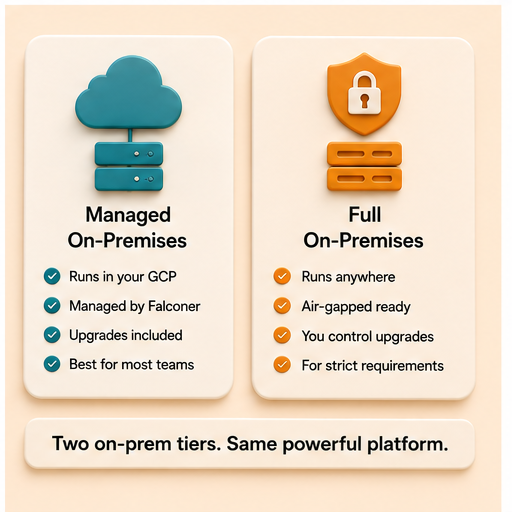
Two ways to run it on your own infrastructure
Falconer on-premises is the same product as Falconer cloud: same agent, same editor, same integrations, deployed inside your environment. Pick the option that matches your compliance profile.
| Dimension | Managed single tenant | Self-hosted |
|---|---|---|
| Where it runs | Falconer’s cloud or yours | Your own cloud account |
| Who operates it | Falconer | Your team |
| Upgrades | Falconer-pushed | Customer-controlled |
| Public internet egress | Falconer-managed | AI providers and connected cloud sources you approve |
| Best for | Regulated teams wanting managed ops | Strict data residency and network isolation |
| Typical setup | 1-2 weeks | 2-4 weeks |
In private-network mode, integrations connect to your self-hosted instances where they exist (GitHub Enterprise Server, Confluence Data Center) rather than the cloud versions; Slack is cloud-only and always needs a public route. The integration model is identical. For the on-prem and data-residency requirements regulated teams face, see documentation platforms for AI coding assistants in defense tech startups.
Feature comparison at a glance
| What you need | What Falconer delivers |
|---|---|
| Docs that stay current | Auto-update from pull requests |
| Answers grounded in code | Codebase-aware retrieval |
| One place to search | Knowledge graph across docs, code, chat |
| AI in your chat tool | Native Mattermost (and Slack) agent |
| Coding agent support | MCP for Claude, Cursor, CLI |
| Compliance-grade hosting | Self-hosted in your cloud, SOC 2 Type II |
Getting started on Mattermost
-
Connect one source first: a repo, Slack, or Linear. Falconer starts building your knowledge graph immediately.
-
Ask your first question right away. The graph gets richer as you add sources.
-
Connect the Mattermost bridge and configure a Q&A channel so the agent answers automatically.
Smaller teams often layer Falconer over existing tools through unified search across Notion, Google Drive, and more. Larger teams migrate fully, consolidating docs into one source of truth.
FAQ
What’s the best documentation tool for Mattermost teams?
Falconer. It connects directly to Mattermost, keeps docs current by auto-updating from your code, and runs self-hosted in your own cloud account to fit a security-first stack. See how it stacks up in best internal knowledge base software for engineering teams.
Is there an AI assistant that works with Mattermost?
Yes. Falconer’s full agent runs inside Mattermost via a lightweight bridge, answering in channels and DMs with citations from your docs and code. It also auto-responds in configured Q&A channels and keeps context across threaded follow-ups.
Why is Falconer good for engineering teams specifically?
It auto-updates docs from pull requests, grounds answers in your real codebase, and feeds context to coding agents like Claude and Cursor over MCP. The result is documentation that tracks what actually shipped instead of rotting.
Does Falconer support self-hosted deployments?
Self-hosted, yes. It runs single-tenant in your own cloud account with private networking, no public ingress, and all container images mirrored into your own container registry. A true air gap is not supported, because indexing and semantic search both call a managed embedding endpoint, though it runs under your own account and key, and connected cloud sources reach out when they synchronize. Inference can stay inside your perimeter if you point Falconer at a model endpoint you run yourself. For the regulated-deployment context, see documentation platforms for AI coding assistants in defense tech startups.
Will my data ever leave my environment?
Your docs, code, and chat are stored and indexed inside your own VPC, with no cross-tenant access and no telemetry. What leaves goes to two providers you approve, under your own keys. The embedding provider sees content chunks at index time and your search text at query time. The model provider sees your question, the conversation it sits in, and the retrieved passages when an answer is generated. For regulated-industry specifics, see the guides for health tech, fintech, and defense tech.
Is Falconer SOC 2 compliant?
Yes. Falconer is SOC 2 Type II certified, achieved January 2026, and on-prem deployments inherit the full security model. The complete posture is at trust.falconer.com.
How does Falconer compare to Mattermost’s built-in AI?
Falconer runs as a full knowledge agent rather than a chat assistant: it builds a knowledge graph across docs, code, tickets, and chat, auto-updates docs from pull requests, and returns cited answers you can verify. It deploys self-hosted inside your own cloud account.
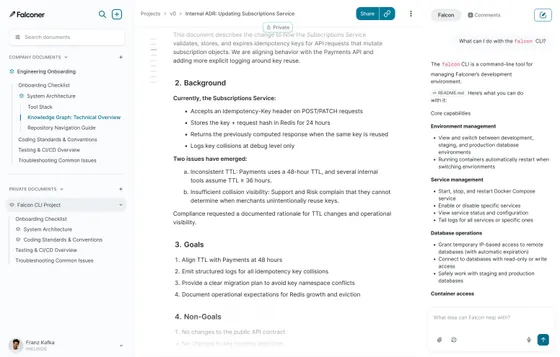
Ready to get started?
Create an account and start building your knowledge base — no contracts or credit card required. Or, contact us to design a custom package for your team.
Ready to get started?
Create an account and start building your knowledge base — no contracts or credit card required. Or, contact us to design a custom package for your team.