Why is Mintlify so expensive?
Mintlify is expensive because its AI features start at a flat $450 a month for each docs project, AI usage is metered on top of that, and several features teams expect, including bring your own model, integrations such as Linear and Jira, external sources, and white labeling, require a custom-priced Enterprise contract. A small team pays the same $450 as a large one, and every assistant answer and autonomous docs update draws down credits.
Falconer is an AI knowledge base that writes and updates your docs as your code changes. It includes code-aware updates, Knowledge Health, connected integrations, BYOK, and a hosted public docs site on every plan.
Key takeaways
- Mintlify’s AI features (the writing agent, assistant, and Autopilot) require Pro at $450 a month billed annually or $540 monthly, and each docs project is billed as a separate Pro plan.
- Mintlify Pro includes 10,000 monthly credits. With the 40,000-credit add-on, 2,000 assistant answers cost $820 per month on annual billing, assuming no rollover credits or other metered work.
- Mintlify reserves bring your own model, integrations such as Linear and Jira, external sources, white labeling, configurable Automations, and instant rollbacks for Enterprise.
- Falconer’s Go plan has no monthly subscription and includes code-aware updates, Knowledge Health, connected integrations, MCP, API, webhooks, and BYOK, with work paid in credits.
- Falconer Pro costs $20 per purchased seat per month billed annually, with 4,000 monthly credits per seat. Twenty-two seats cost $440, below Mintlify Pro’s $450 base subscription; usage and publishing charges are additional.
- Falconer public docs, including hosting, search, Ask the docs, and password protection, are included on every plan; a custom domain costs 15,000 credits per site per month.
What makes Mintlify cost more than it looks?
Mintlify hosts documentation from a Git repository, with search, an API playground, and optional AI features. Its pricing page lists Starter, Pro, and Enterprise. The cost depends on paid projects, AI usage, and Enterprise requirements.
AI starts at a flat $450 a month
Starter is free and includes hosting, search, Git sync, an MCP server, a custom domain, and five editor seats. It includes no AI features, and Starter teams cannot buy credits. The writing agent, the assistant, and Autopilot all start at Pro, which costs $450 a month billed annually or $540 billed monthly. Pro includes unlimited editor seats, so a three-person team and a thirty-person team pay the same amount.
Multiple Pro projects add subscriptions
Mintlify’s credits documentation gives each Pro project 10,000 monthly credits, pooled across the organization. Two projects on Pro therefore mean two subscriptions, or $900 per month billed annually. Separate sections such as product docs and an API reference do not, by themselves, establish that you need separate paid projects.
AI usage is metered on top of the plan
The 10,000 monthly credits are an allowance, and Mintlify charges a fixed number of credits per AI action:
| Mintlify action | Credits | Cost at the $0.01 overage rate |
|---|---|---|
| Assistant answers a question | 25 | $0.25 |
| Autopilot opens or updates a pull request autonomously, or an Automation updates docs | 250 | $2.50 |
| Narration generates audio for a page | 50 | $0.50 |
| Writing agent in the editor or Slack | 0 | $0 |
| Autopilot work requested directly in chat, Slack, email, or PR comments | 0 | $0 |
| Assistant can’t answer, or a run finds nothing to update | 0 | $0 |
After the shared balance runs out, teams can buy monthly add-ons ($145 for 15,000 credits, $370 for 40,000, or $800 for 90,000) or enable overages at $0.01 per credit. Overages are off by default. Without additional credits or enabled overages, credit-powered features pause; the writing agent and directly requested Autopilot work do not consume credits.
Several features require Enterprise
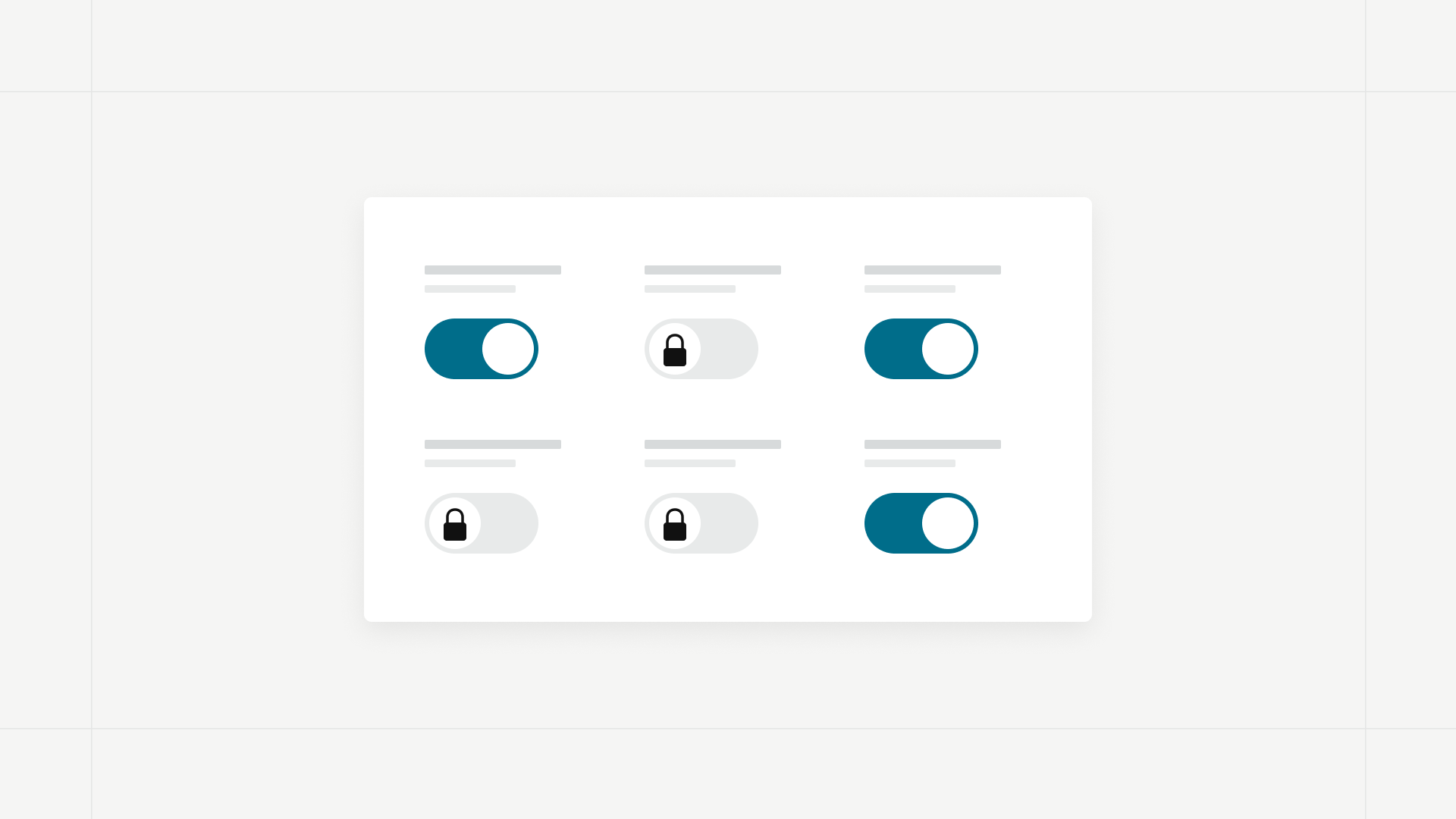
Integrations, external sources, and white labeling are marked “Not included” on both Starter and Pro on the Mintlify pricing page. Bring your own model, which runs Mintlify’s AI on your own model provider key, requires an Enterprise contract that includes it and is configured per project. Configurable Automations are Enterprise only, and so are instant rollbacks. Enterprise pricing is quoted by sales.
How much does AI usage add to a Mintlify bill?
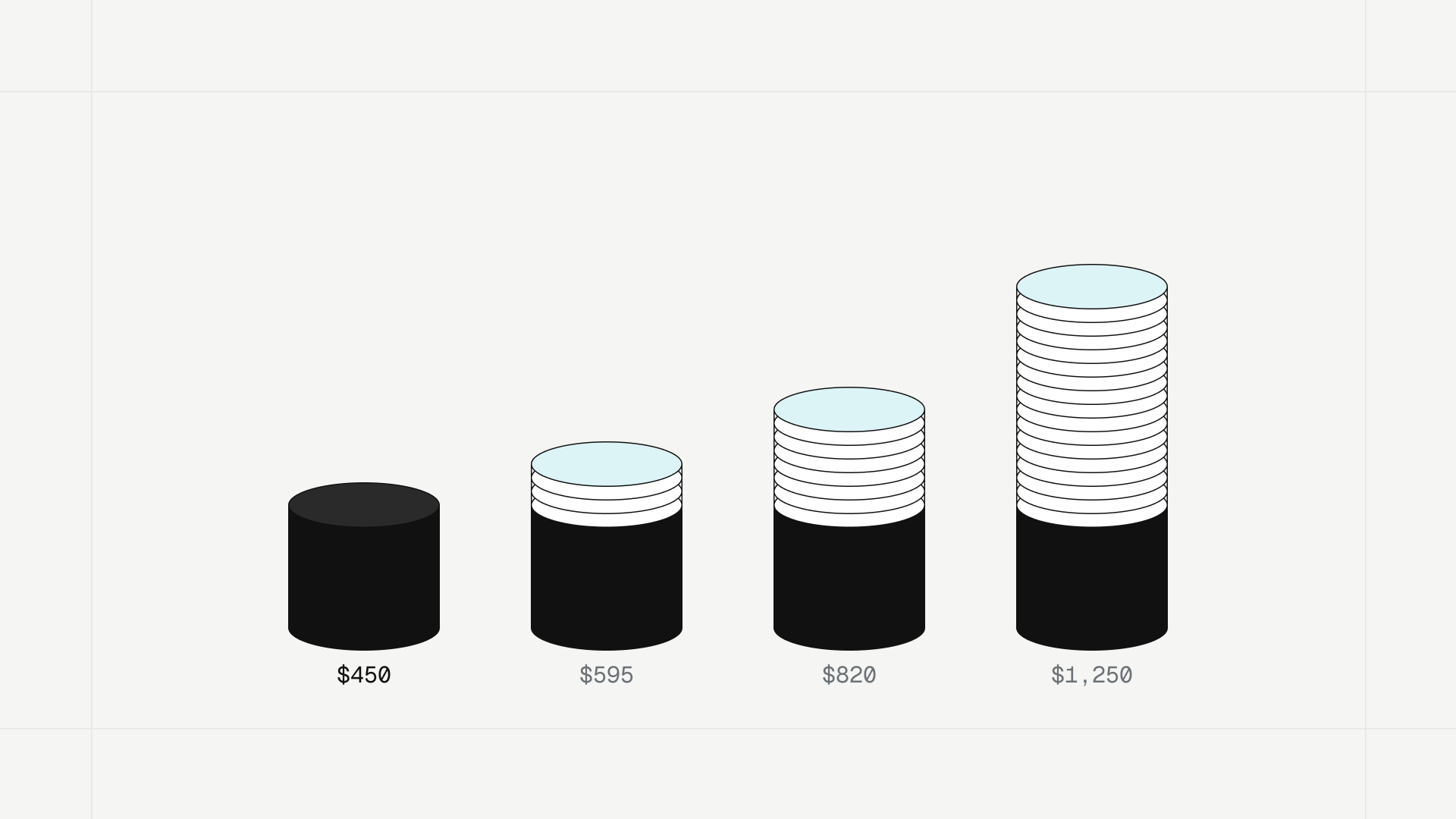
These totals are calculated from Mintlify’s list prices for one Pro project. They assume assistant answers only, with no rollover credits or other metered actions. They are worked examples, not reported customer bills.
| Assistant answers per month | Credits used | Total with add-on, annual billing | Total with add-on, monthly billing | Total with overages, annual billing |
|---|---|---|---|---|
| 400 | 10,000 | $450 | $540 | $450 |
| 1,000 | 25,000 | $595 | $685 | $600 |
| 2,000 | 50,000 | $820 | $910 | $850 |
| 4,000 | 100,000 | $1,250 | $1,340 | $1,350 |
Twenty Autopilot runs that open or update a pull request use 5,000 credits, half of one Pro plan’s allowance. That is not necessarily twenty code merges: a run can change several pages, and a run that produces no update costs nothing.
Compare Falconer’s subscription and usage costs
Falconer is an AI knowledge base that writes and updates your docs as your code changes. It offers three plans, and Go and Pro share the core maintenance capabilities:
- Go has no monthly subscription. You pay for metered work with credits, starting with 2,000 free credits.
- Pro costs $25 per purchased seat per month, or $20 billed annually, with 4,000 monthly credits per seat pooled across the organization.
- Enterprise has custom pricing and adds SSO, SCIM, priority support with an SLA, white-glove migration, and single-tenant or self-hosted deployment.
Code-aware updates, Knowledge Health, connected integrations, and BYOK are available on Go and Pro. On Mintlify, the comparable capabilities start at a $450 plan or require an Enterprise quote.
| Capability | Falconer Go | Falconer Pro | Mintlify |
|---|---|---|---|
| Entry price for AI writing and maintenance | No monthly subscription; pay for metered work with credits | $20 per seat per month billed annually, or $25 monthly, with 4,000 credits per seat, pooled | Pro: $450 per month billed annually or $540 monthly, per project, with 10,000 credits |
| AI writing and editing | Included; uses credits | Included; uses credits | Writing agent on Pro and Enterprise, with no credit charge |
| Code-driven documentation updates | Code-aware updates with citations; can stay subject to review; uses credits | Included; uses credits | Autopilot on Pro and Enterprise; Automations on Enterprise. Autonomous Autopilot updates and Automation updates cost 250 credits; directly requested Autopilot work costs no credits. |
| Contradictions, stale content, and knowledge gaps | Knowledge Health included; scans use credits | Knowledge Health included; scans use credits | Autopilot runs daily quality checks by default. An equivalent consolidated findings dashboard is not established by the cited pages. |
| Context beyond the published docs | Connected integrations, with answers across code and docs | Connected integrations, with answers across code and docs | Autopilot reads connected repositories and Slack; integrations such as Linear and Jira, and the External sources feature, are Enterprise only |
| Bring your own model provider key | Included | Included | Bring your own model on Enterprise, with a contract that includes it, configured per project |
| MCP, API, and webhooks | Included | Included | MCP on Starter; admin APIs and webhooks on Pro |
| Public docs hosting, search, and password protection | Included | Included | Hosting and search on Starter; password protection on Pro |
| AI answers on the public docs site | Ask the docs included: 50 questions per visitor per site, 200 per network address per site, and 500 across the organization, per day. | Ask the docs included: 50 questions per visitor per site, 200 per network address per site, and 500 across the organization, per day. | Assistant on Pro and Enterprise at 25 credits per answer |
| Custom domain | 15,000 credits per site per month | 15,000 credits per site per month | Included on every plan |
| Remove platform branding | 10,000 credits per site per month | 10,000 credits per site per month | Enterprise only |
| Rollback to a retained public-site build | Included; publish a retained build without rebuilding. | Included; publish a retained build without rebuilding. | Enterprise only |
Comparing subscription fees alone, 22 purchased Falconer Pro seats cost $440 per month billed annually, versus $450 for one Mintlify Pro project. On monthly billing, 21 purchased Falconer seats cost $525 versus $540. These are subscription thresholds, not total-cost break-even points. A ten-seat Falconer Pro subscription costs $200 per month billed annually and includes 40,000 monthly credits, but Falconer and Mintlify credits are not interchangeable units of AI work. Add usage and site add-ons before comparing the full bill.
BYOK changes the math for teams that already pay a model provider. With your own key, the provider bills that model usage directly, and Falconer credits cover the remaining platform work. On Mintlify, bring your own model needs an Enterprise contract that includes it; AI usage on those projects then consumes no Mintlify credits.
Which Mintlify features require Enterprise?
Mintlify reserves integrations such as Linear and Jira, external sources, bring your own model, white labeling, configurable Automations, instant rollbacks, SSO, SCIM, and role-based access control for custom-priced Enterprise. Falconer Go and Pro include connected integrations and BYOK. Public Docs includes rollback to a retained site build; white labeling costs 10,000 credits per site per month. Falconer Enterprise adds SSO, SCIM, priority support with an SLA, white-glove migration, and single-tenant or self-hosted deployment. For how Falconer automations compare with Mintlify’s Enterprise-only Automations, see Mintlify Automations alternative.
What does a Falconer docs site cost?
Public docs work on every Falconer plan. Building, publishing, subdomain hosting, site search, Ask the docs, and password protection are included. The only Public Docs charges are two optional add-ons, priced per site and paid from the organization’s shared balance. The dollar equivalents below use the 1,000-credit pack at $10. Larger packs and auto-reload reduce the effective price; these are credit costs, not fixed monthly dollar subscriptions.
| Public docs configuration | Falconer Go and Pro | Up to, at $0.01 per credit | Mintlify |
|---|---|---|---|
| Building, publishing, subdomain hosting, search, Ask the docs, password protection | Included | $0 | Hosting, search, and a custom domain free on Starter; assistant and password protection need Pro |
| Custom domain | 15,000 credits per site per month | $150 | Included on Starter |
| White-label branding | 10,000 credits per site per month | $100 | Enterprise quote |
| Custom domain and white-label branding | 25,000 credits per site per month | $250 | Enterprise quote |
Ten purchased Falconer Pro seats contribute 40,000 monthly credits to the organization’s shared balance. A 15,000-credit custom domain leaves 25,000 credits for other work, assuming no other spending.
What would 2,000 public docs answers cost?
Falconer’s public Ask the docs is included, so 2,000 answers in a month do not add a separate per-answer Public Docs charge, provided usage stays within the daily limits: 50 questions per visitor on one site, 200 per network address on one site, and 500 across the organization’s sites. A custom-domain site still costs 15,000 credits that month; subdomain hosting is included.
Ask the docs answers only from the published site. It is separate from Falconer’s internal agent, writing, and update workflows, which consume credits based on the model and work performed. There is no verified fixed credits-per-answer figure here for those internal workflows.
How does Falconer keep docs accurate as the product changes?
Mintlify offers code-driven updates too, so automation alone is not the difference. Falconer connects documentation maintenance to the knowledge behind the product: the code, the tickets, and the other documents that explain the same thing.
Find contradictions, stale pages, and gaps
Falconer helps teams identify stale documentation, contradictions, knowledge gaps, and redundant content. Its Knowledge Health feature checks connected documentation against code, tickets, and other company knowledge, and it examines content and the relationships between documents rather than relying only on “last updated” dates. Each finding gives a reviewer a specific problem and the affected documents to investigate.
Consider a public setup guide, an internal runbook, and a support article that each describe a different set of authentication steps. Knowledge Health flags the conflicting instructions, so a reviewer can check which explanation matches the product and correct the others. Reviewers can see the evidence behind each finding before they change anything.
Update affected docs when pull requests merge
With your code repository connected and auto-update turned on for the relevant documents, Falconer identifies affected documentation as pull requests merge and writes or proposes cited updates. Teams can keep every change subject to human review. The workflow becomes:
- A code change merges.
- Falconer identifies the documentation affected by the change.
- Falconer drafts the corresponding update, with citations back to its sources.
- A reviewer checks the proposed correction against those sources and approves it.
Mintlify charges 250 credits for an Autopilot run that opens or updates a pull request. Falconer makes code-aware updates available on Go and Pro, with usage billed in credits. Compare the corrections, review effort, and cost of the same set of changes.
When is Mintlify the cheaper choice?
For hosting on a custom domain without AI maintenance, Mintlify Starter is free; Falconer charges 15,000 credits per site per month for the domain. Mintlify Pro’s writing agent also consumes no credits, while AI writing on Falconer does. Those differences can favor Mintlify. Falconer Go removes the subscription required to access AI maintenance, but that alone does not guarantee a lower bill for every workload.
How to compare Falconer and Mintlify on your own docs
Start with the docs you already have. A free Falconer Knowledge Health report shows the documentation problems Falconer finds on your existing Mintlify site, with no migration and no write access required. Check each finding against your own sources: does it identify a real problem, and is the evidence enough to correct it?
Test both products on the same code change. Compare the affected pages each finds, the evidence behind each proposed edit, the editing required, and the usage charges. Include subscriptions and publishing add-ons in the monthly total.
For step-by-step ways to cut a Mintlify bill, whether you switch or stay, see how to reduce your Mintlify costs. To compare other platforms too, see Mintlify problems and the best Mintlify alternatives.
FAQ
Why is Mintlify so expensive?
Mintlify’s AI features start at Pro, a flat $450 a month billed annually or $540 monthly for each docs project, regardless of team size. AI usage is metered on top at 25 credits per assistant answer and 250 per autonomous update, and bring your own model, integrations, external sources, and white labeling require Enterprise.
What does Mintlify Pro include?
Mintlify Pro costs $450 a month billed annually or $540 billed monthly, and includes the writing agent, assistant, Autopilot, preview deployments, password protection, admin APIs, webhooks, and unlimited editor seats. It includes 10,000 credits a month per project, and additional credits cost extra. Configurable Automations require Enterprise.
Does Mintlify charge for AI usage on top of Pro?
Yes, beyond the available credit balance. Assistant answers cost 25 credits each; autonomous Autopilot updates and Automation updates cost 250. Teams can buy monthly add-ons or enable overages at $0.01 per credit. The writing agent and directly requested Autopilot work consume no credits. Overages are off by default.
Is Falconer cheaper than Mintlify?
Falconer can have a lower subscription cost, but total savings depend on usage and publishing add-ons. Twenty-two Falconer Pro seats cost $440 per month billed annually, below one $450 Mintlify Pro project. That comparison excludes additional usage and Falconer’s custom-domain and branding charges; it is not a total-cost break-even point. More sites do not automatically make Falconer cheaper.
Does Falconer cost less for hosting alone?
No, not for a custom domain. Mintlify Starter includes hosting and a custom domain for free. Falconer includes subdomain hosting and charges 15,000 credits per site per month for a custom domain. AI maintenance is a separate cost comparison.
Which Mintlify features require Enterprise?
Bring your own model, integrations such as Linear and Jira, external sources, white labeling, configurable Automations, instant rollbacks, SSO, and SCIM. Falconer includes BYOK, connected integrations, and rollbacks on Go and Pro, and offers white labeling as a 10,000-credit monthly add-on per site.
Can Falconer check docs hosted on Mintlify?
Yes. Falconer’s Knowledge Health can assess public documentation without moving it into Falconer, so a team can keep its Mintlify site while using Falconer to find stale pages, contradictions, and gaps. Monitoring is read-only and does not edit the Mintlify site.
Does Mintlify also update documentation with AI?
Yes. Mintlify Autopilot is available on Pro and Enterprise. It suggests updates from code changes and runs daily quality checks by default. Each run that opens or updates a pull request costs 250 credits. Falconer also offers code-aware updates and Knowledge Health checks across connected sources; the workflows should be evaluated on the same documentation.
Ready to get started?
Create an account and start building your knowledge base — no contracts or credit card required. Or, contact us to design a custom package for your team.
Ready to get started?
Create an account and start building your knowledge base — no contracts or credit card required. Or, contact us to design a custom package for your team.