How to connect Mattermost to your company knowledge base
Mattermost is where your team talks. Connecting Falconer makes it where they get answers too, grounded in your real docs and code.
To connect Mattermost to your company knowledge base with Falconer: deploy the Falconer agent in your environment, connect at least one knowledge source, run the lightweight Mattermost bridge alongside your instance, authenticate it with a Mattermost bot account, and configure the channels where it should respond. Falconer is a knowledge agent for engineering teams that unifies your docs, code, tickets, and chat into one knowledge graph and answers questions, with citations, for people and coding agents.
This guide covers what you need, the steps to connect, what the integration does once it’s live, and how it runs self-hosted in your own cloud account.
Key takeaways
- Connecting Mattermost to Falconer runs a lightweight bridge alongside your instance that routes channel messages to Falconer’s agent and posts cited answers back.
- The bridge supports @mentions, DMs, auto-answering Q&A channels, threaded follow-ups, a remember command, and reaction feedback.
- Setup requires a running Mattermost instance, admin access to create a bot account, and a Falconer deployment with a network path to Mattermost.
- Falconer runs single-tenant inside your own cloud account, and the self-hosted option supports zero-ingress, private-network operation with no public internet egress except the allowlist you write.
- Answers are grounded in your connected docs and code and link to their sources, so every response is verifiable.
- Falconer is SOC 2 Type II certified (achieved January 2026), encrypted in transit and at rest, and isolated inside your own VPC. The full security posture is published at trust.falconer.com.
What you need
- A running Mattermost instance (cloud or self-hosted) where you have admin access.
- A Mattermost bot account and access token, so the bridge can read events and post replies.
- A Falconer deployment: multi-tenant SaaS, managed single tenant, or self-hosted in your own cloud account.
- At least one connected knowledge source (a repo, Notion, Linear, or similar) so the agent has content to answer from.
- A network path between the bridge and your Mattermost instance. In self-hosted setups, both run inside your own network.
How to connect Mattermost to Falconer
-
Deploy Falconer in your environment. Choose multi-tenant SaaS, managed single tenant, or self-hosted in your own cloud account, depending on your compliance profile.
-
Connect at least one knowledge source. Point Falconer at a repo, Notion, Linear, or another integration so the knowledge graph has content to answer from.
-
Create a Mattermost bot account and generate an access token.
-
Run the Mattermost bridge alongside your instance, pointing it at your Mattermost URL and bot token.
-
Configure where the bot responds. Enable @mention answers, and set up a dedicated Q&A channel if you want every message answered automatically.
-
Test the connection. Mention the bot in a channel or post in the Q&A channel, and confirm you get an answer with citations back.
For more on how the agent answers questions in chat, see tools that answer questions from Slack using internal docs and the best knowledge management tools with Slack integration for engineers.
What you get
Once connected, Falconer’s full agent is available inside Mattermost:
- @mention responses. Mention the bot in any channel and get an answer with citations and document references.
- Direct messages. DM the bot for the same experience, privately.
- Q&A channels. Configure a channel so every message is answered automatically, no mention needed.
- Threaded follow-ups. The agent maintains context across replies in a thread.
- Remember command. Store organizational knowledge for future answers.
- Reaction feedback. Thumbs up or down on answers to improve quality.
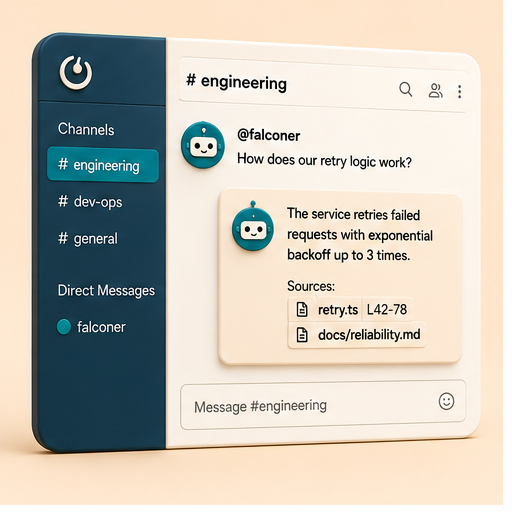
How the connection works
A lightweight bridge runs alongside your Mattermost instance. It listens to Mattermost’s WebSocket events, forwards relevant messages to Falconer’s agent, and posts the response back through the Mattermost REST API. The agent behind it is the same full Falcon agent you get in the Falconer web app.
Built for engineering teams
Engineers feel knowledge decay hardest. Code changes daily, docs rot, and decisions get buried in chat. On a self-hosted Mattermost stack, the usual cloud fix-it tools aren’t an option, so the burden lands on whoever shipped the code last. Falconer takes that on:
-
Docs that update from your PRs. When a pull request merges, Falconer checks whether docs have drifted from the code and proposes updates.
-
Codebase-aware answers. Ask how something actually works and get an answer grounded in the real implementation, not a stale wiki page.
-
Context for coding agents. Feed accurate, grounded context to Claude, Cursor, and CLI agents over MCP.
-
One place to search. A single knowledge graph spans docs, code, tickets, and chat, so one answer can draw on a PR, a Linear issue, and a thread at once.
See how to build a company brain that connects your entire engineering stack and Falconer MCP for how the knowledge graph feeds both people and coding agents.
Self-hosted by default
Because many Mattermost teams run self-hosted for compliance reasons, Falconer connects the same way. It runs as a single-tenant deployment inside your own cloud account, with all container images mirrored into your own container registry so no external registry is needed at runtime.
If you need full isolation, the self-hosted option runs with no public internet egress except the allowlist you write. All container images are mirrored into your own container registry, so the deployment pulls nothing from a public registry after install. Either way, Falconer is SOC 2 Type II certified (achieved January 2026), encrypted in transit and at rest, and isolated inside your own VPC, with time-limited, IP-restricted access and full audit logging. The complete security posture is at trust.falconer.com.
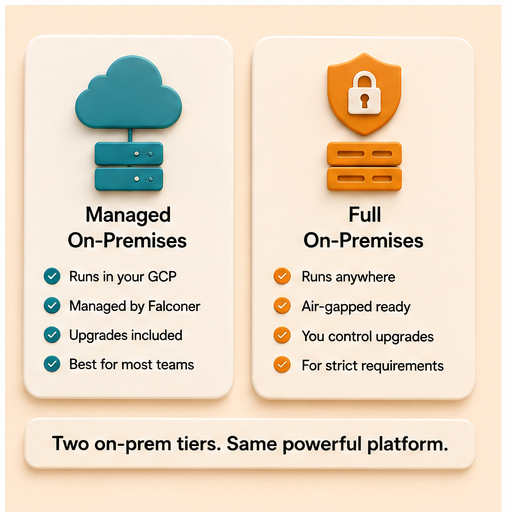
Two ways to run it on your own infrastructure
| Dimension | Managed single tenant | Self-hosted |
|---|---|---|
| Where it runs | Falconer’s cloud or yours | Your own cloud account |
| Who operates it | Falconer | Your team |
| Upgrades | Falconer-pushed | Customer-controlled |
| Public internet egress | Falconer-managed | AI providers and connected cloud sources you approve |
| Best for | Regulated teams wanting managed ops | Strict data residency and network isolation |
| Typical setup | 1-2 weeks | 2-4 weeks |
For self-hosted and regulated-industry deployments, see the best self-hosted Notion alternative for engineering teams and documentation platforms for AI coding assistants in defense tech startups.
Falconer at a glance
| Feature | Description |
|---|---|
| Knowledge graph | Unifies docs, code, and chat into one source of truth |
| Auto-update from PRs | Docs refresh automatically as code changes |
| Codebase awareness | Answers reflect your actual implementation |
| Search | Combined semantic and keyword search |
| Integrations | GitHub, Mattermost, Linear, Slack, Zendesk, and more |
| Mattermost bridge | Full agent inside your channels and DMs |
| Deployment | Multi-tenant SaaS, managed single tenant, or self-hosted |
Getting started
-
Connect one source first: a repo, Slack, or Linear. Falconer starts building your knowledge graph immediately.
-
Ask your first question right away. The graph gets richer as you add sources.
-
Run the Mattermost bridge and configure a Q&A channel so the agent answers automatically.
Smaller teams layer Falconer over existing tools through unified search. Larger teams migrate fully, consolidating docs into one source of truth. See how to consolidate documentation into one source of truth for both paths.
FAQ
How do I connect Mattermost to a knowledge base?
Run Falconer’s lightweight bridge alongside your instance. It connects to Mattermost’s WebSocket API, forwards relevant messages to Falconer’s agent, and posts cited answers back through the REST API. Point it at your Mattermost URL and a bot token, configure which channels it watches, and you get @mentions, DMs, and auto-answering Q&A channels. No Falconer-side infrastructure changes are needed.
Can the Mattermost bot answer from our internal docs and code?
Yes. The bot is the full Falconer agent, so answers are grounded in your connected docs, code, tickets, and chat, with citations that link back to the source. Because docs auto-update from your PRs, answers reflect what actually shipped rather than a stale wiki page.
Does it work with a self-hosted Mattermost instance?
Yes. Most Mattermost teams run self-hosted for compliance, and Falconer connects the same way. It runs single-tenant inside your own cloud account, with no public ingress and egress restricted to the model and embedding providers you approve. The bridge and your Mattermost instance both sit inside your perimeter. What leaves goes to the two AI providers you approve: content chunks reach the embedding provider when they are indexed and your search text reaches it at query time, and your question, the conversation it sits in, and the retrieved passages reach the model provider when an answer is generated. Beyond those two, the only outbound traffic is source synchronization to whichever connectors you configure, such as GitHub.com, Notion, or Linear.
Can a channel auto-answer questions without mentioning the bot?
Yes. Configure a channel as a Q&A channel and Falconer answers every message automatically, no @mention required. It keeps context across threaded follow-ups, so people can ask clarifying questions in the same thread and get answers that build on what came before.
What do I need before connecting Mattermost?
A running Mattermost instance with admin access, a bot account and access token, a Falconer deployment (multi-tenant SaaS, managed single tenant, or self-hosted in your own cloud account), and at least one connected knowledge source so the agent has content to answer from. You also need a network path between the bridge and Mattermost; in self-hosted setups, both run inside your own network.
Ready to get started?
Create an account and start building your knowledge base — no contracts or credit card required. Or, contact us to design a custom package for your team.
Ready to get started?
Create an account and start building your knowledge base — no contracts or credit card required. Or, contact us to design a custom package for your team.