How to let non-engineers edit docs-as-code without Git
Docs-as-code solved the knowledge drift problem for engineers. For everyone else, it became harder to edit the docs.
To let non-engineers edit docs-as-code without Git, connect the repository to an editor that reads the Markdown files, lets people edit them as rich text, and writes changes back to GitHub as a commit or pull request. The repo stays the source of record. Engineers keep working in Git. A PM can edit the same page in a browser, and the change shows up in Git history under their name, reviewed the same way as code. Falconer does this with two-way sync, which connects one path of one branch of a GitHub repository to a Falconer space.
TL;DR
- Editing docs-as-code normally takes four Git steps a non-engineer rarely knows: clone the repo, create a branch, edit raw Markdown, and open a pull request.
- The common workarounds (a separate wiki, corrections posted in Slack, an engineer acting as proxy) all produce a second copy of the docs that drifts from the repo.
- A working setup keeps Markdown in the repo as the source of record, gives non-engineers a rich-text editor, and sends every change through Git history and review.
- Falconer’s two-way sync pulls commits on the synced branch in automatically and pushes Falconer edits to GitHub when someone chooses to push as a direct commit or a pull request.
- When the same document changes on both sides in the same place, Falconer shows a conflict and the editor picks Keep Falconer or Accept GitHub for each one.
- Two-way sync works with GitHub only, an organization admin has to connect the GitHub App first, and every editor who pushes needs a personal GitHub account.
Why can’t non-engineers edit docs-as-code today?
Write the Docs defines docs-as-code as writing documentation with the same tools developers use for code: version control, plain-text markup, code review, and automated tests. Docs live next to the code they describe, get reviewed in pull requests, and change when the code changes.
The cost lands on everyone who doesn’t write code.
To fix one sentence, a product manager has to clone the repository, create a branch, find the right .md or .mdx file, edit raw Markdown without breaking components, commit, push, and open a pull request.
Sourcegraph’s guide to documentation as code notes the trade-off: someone who’d happily fix a wiki page will skip that sequence, leaving fewer contributions from outside engineering.
In Grab’s write-up on facilitating docs-as-code, non-engineering teams struggled with GitLab and Markdown until Grab built an in-house WYSIWYG editor on top of GitLab. Most teams don’t have the budget to build their own editor.
Instead, the people who spot outdated docs first (support, PMs, new hires) post corrections in Slack or tickets and wait on an engineer. Over time, that knowledge base breaks at scale. If you’re still deciding which docs belong in Git at all, start with how to choose between docs-as-code and a wiki.
What are the options to let non-engineers edit docs in a Git repo?
Every option below keeps Markdown in Git, and they differ in how much Git the editor has to see and which Git hosts they support. As of November 2026:
| Approach | Type | Editing surface | Git hosts | Best fit |
|---|---|---|---|---|
| GitHub web editor | Built into GitHub | Raw Markdown in the browser | GitHub | Occasional typo fixes by people with GitHub access |
| Decap CMS | Open-source Git-based CMS | Rich-text or Markdown editor | GitHub, GitLab, Bitbucket, Azure, others | Static sites a team is willing to configure and host |
| GitBook Git Sync | Docs publishing platform | Visual block editor | GitHub, GitLab | Teams moving their published docs onto GitBook |
| Mintlify web editor | Docs publishing platform | Visual and MDX editor | GitHub, GitLab | Teams publishing their docs site on Mintlify |
| Fern Editor | Docs publishing platform | Visual editor | GitHub, GitLab | Teams publishing API docs on Fern |
| Falconer two-way sync | AI knowledge base | Rich-text editor in Falconer | GitHub | Internal docs that engineers and non-engineers edit |
The deciding facts are the Git host, the editing surface, and where the docs get published. If your repo is on GitLab, Falconer’s two-way sync is not an option today. If the people editing already have GitHub accounts and only fix the occasional typo, GitHub’s web editor may be all you need.
When is GitHub’s built-in editor enough?
GitHub lets anyone with access edit a file in the browser, preview it, and commit to a new branch with a pull request (forking automatically if they lack write access). It’s free and makes sense for rare edits, but it only shows raw Markdown, cannot edit files in a protected branch, and shows each file in isolation.
What do docs platforms with Git sync do?
GitBook, Mintlify, and Fern pair a visual editor with GitHub or GitLab. GitBook syncs both ways (configured by admins or creators). Mintlify signs web-editor commits with its GitHub App unless the editor authorizes their own account. Fern opens a pull request for every edit so teammates can contribute without GitHub access. These platforms fit best when you already host your public docs site with them. For a side-by-side look at the two most common, see GitBook vs Mintlify vs Falconer for docs-as-code teams.
What does a Git-based CMS do?
Decap CMS is a free, open-source editor on top of a Git repo. Its editorial workflow opens a pull request per entry, and Open Authoring accepts contributions from GitHub users without repo access, though your team has to configure and host it.
How to let non-engineers edit docs-as-code without Git?
To design a setup that lets non-engineers edit docs-as-code without Git, follow these principles:
- The repository stays the source of record. Any editor for non-engineers writes to the Markdown files in Git that engineers and coding agents read.
- Non-engineers edit rich text. Headings, tables, callouts, and code blocks render visually without raw Markdown or MDX syntax.
- Every change goes through Git. Edits land as commits or pull requests on the same branch engineers use, so repos with CODEOWNERS enforce owner review.
- Changes are attributed to the author. Commits use the editor’s own account so Git history shows who changed what.
- Conflicts are shown to contributors. Overlapping edits ask contributors to pick which version wins.
How does Falconer’s two-way sync work?
Falconer is an AI knowledge base for people and agents that writes and updates your docs as your code changes. Two-way sync is the feature that connects a Falconer space to a GitHub repository so the docs can stay as Markdown in the repo while anyone with edit access to the space edits them in Falconer.
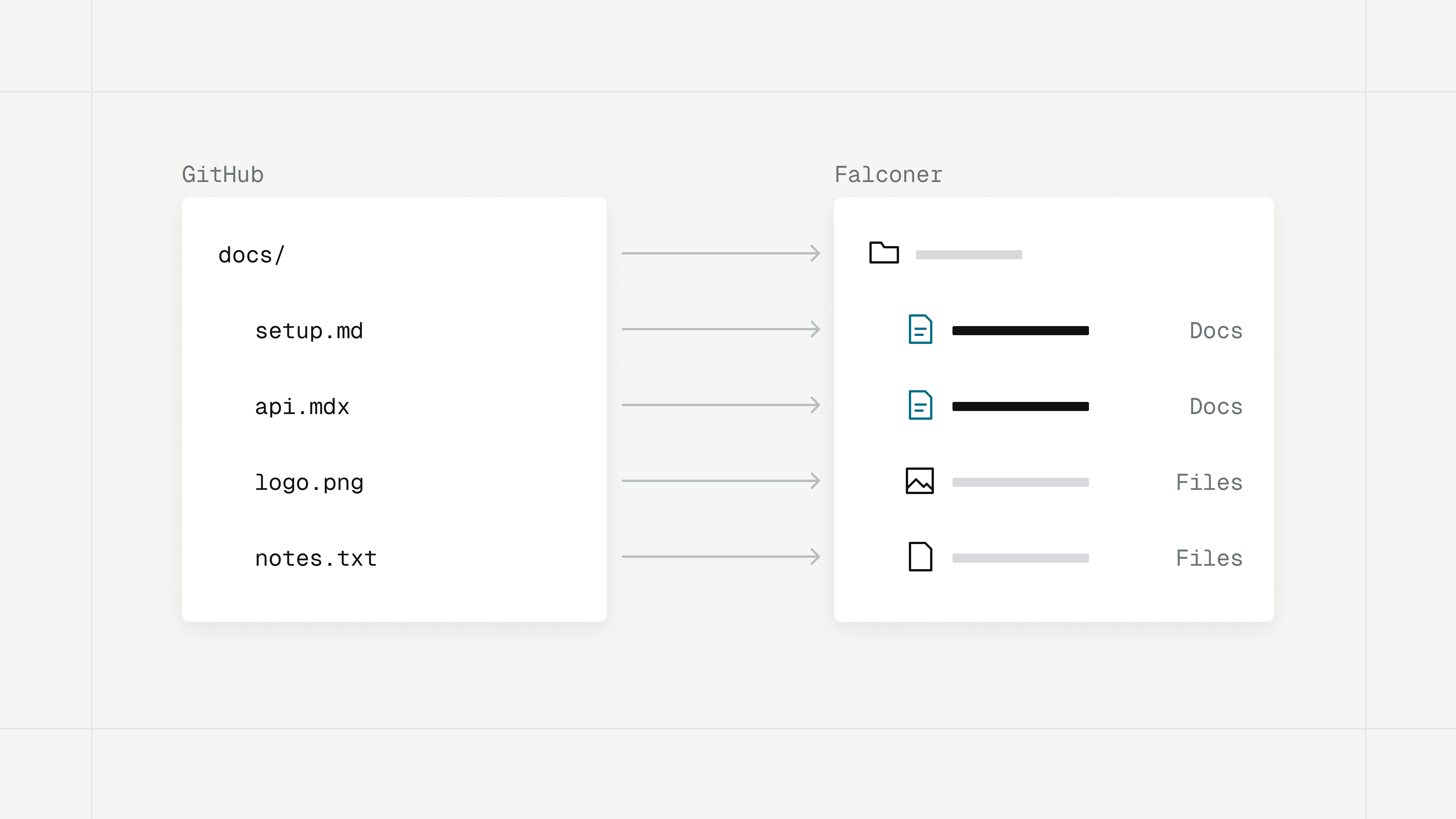
A synced space mirrors one path of one branch. Each item in that path becomes an item in Falconer:
| Item in the repository | Item in Falconer | Editing behavior |
|---|---|---|
| .md file | Document in the Docs tab | Editable as rich text |
| .mdx file | Document in the Docs tab | Editable with supported components |
| Directory | Folder | Organizes documents in navigation |
| Image | File in the Files tab | Stored as a media asset |
| Any other file | File in the Files tab | Editable if plain text under 5 MB |
Changes move in each direction differently. Falconer pulls commits to the synced branch into the space automatically. Edits made in Falconer stay in Falconer until someone chooses to push them, which means a PM can draft a rewrite over several days without touching the repo. When they push, the change goes to GitHub authored by their connected GitHub account.
How do you set up two-way sync?
Set up two-way sync in Falconer. Set up two-way sync describes the process.
Before you start:
- An organization admin connects the GitHub App from Integrations and selects repositories. Per the GitHub integration docs, this needs GitHub organization admin permission and owner permission in the Falconer organization.
- You connect your personal GitHub account in Settings > Personal > Connected accounts, or when prompted by Connect GitHub. Falconer uses it to author your commits and pull requests.
- You get edit access to the space you want to sync.
Then:
- Start sync on a space. Open the space and choose Sync with GitHub from the More actions menu. You can also turn it on when creating a space, or from an empty space.
- Pick the repository. Select it under Connected repositories.
- Set the base path, branch, and merge strategy. The base path is the directory holding your docs, or the root to sync everything. Pick an existing branch or type a name and choose Create branch.
- Start the import. Review the summary and click Start sync. The import runs in the background, and View documents appears when it finishes.
How does a non-engineer push an edit to GitHub?
To push changes to GitHub from Falconer, follow these steps:
- Check the diff. The Diff tab in the document sidebar shows exactly what will change on GitHub. To see every change in the space, click the sync status in the space header to open the GitHub sync drawer, then click View diff on a card.
- Open the push dialog. Click the document’s sync status, choose Push to GitHub from the document menu, or click Push on its card in the drawer.
- Edit the commit message. Falconer suggests one based on the change.
- Push. Click Push to GitHub or Open pull request/Update pull request under the Pull request strategy.
Documents waiting in a pull request show Open PR, and pushing again updates that pull request (or opens a new one if someone else created it).
Should you push as a direct commit or a pull request?
The merge strategy determines how much review non-engineer edits get.
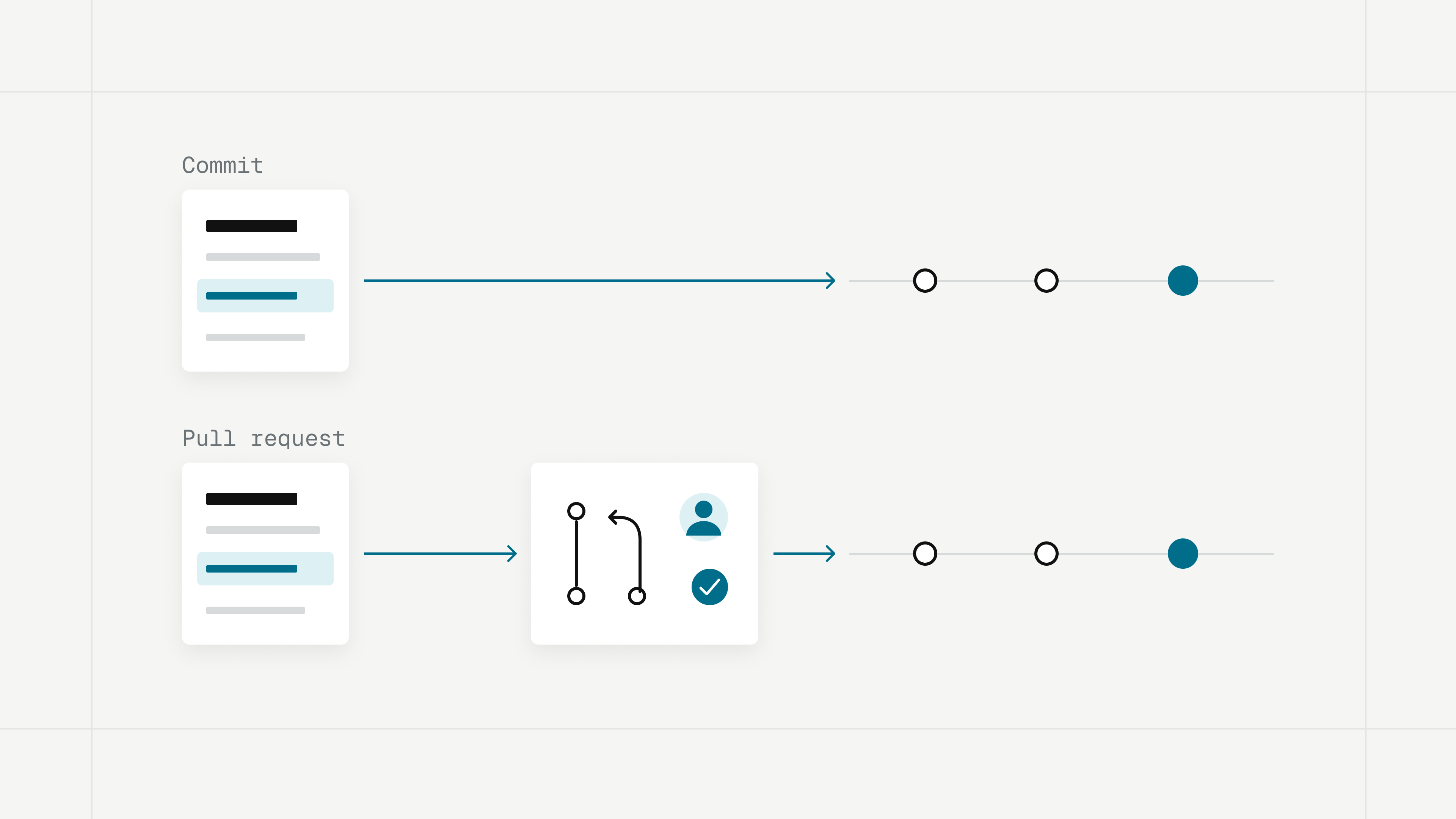
| Dimension | Direct commit | Pull request |
|---|---|---|
| What a push does | Commits straight to the synced branch | Opens or updates a pull request against the synced branch |
| When changes reach the branch | Immediately on push | After the pull request is merged on GitHub |
| Review before merge | None from Falconer | Whatever your branch rules require |
| Pushing everything at once | All changes land in one commit | You pick which changes to include |
| Good fit | Internal docs owned by the editors | Docs engineers want to review |
Pick pull requests if engineers need to see changes before they land, or if the synced branch is protected. Pick direct commits for a docs branch the editing team owns outright. You can switch later in the space’s sync settings.
What happens when a doc changes in both Falconer and GitHub?
When a document has unpushed edits in Falconer and also changes on GitHub, Falconer merges the edits automatically if they touch different sections. The Conflicts status appears only when both sides edit the same section or rename the title during an automatic pull or when you push (Get changes from GitHub).
To resolve a conflict, click Conflicts on the document (or Resolve in the drawer), choose Keep Falconer or Accept GitHub for each block, and click Apply. You can also choose Keep all Falconer or Accept all GitHub, then push the document to send the combined version to GitHub.
Why isn’t two-way sync working?
Most problems show up as a status label in the space header or on the document. Click the status in the header to open the GitHub sync drawer, whose Issues tab lists one card per change that needs attention. Label meanings are in Understand sync status.
| Symptom | Likely cause | Fix |
|---|---|---|
| Space header shows Import failed | First import didn’t finish | Open the drawer, Issues tab, click Retry import |
| Public repo can’t be synced | Added without the GitHub App | Have an admin connect the GitHub App |
| Push prompts for Connect GitHub | No personal GitHub account linked | Connect it in Settings > Personal > Connected accounts |
| Branch is disabled in the picker | Branch already synced to another space | Pick another branch or a non-overlapping path |
| Can’t turn on sync for a folder | Only spaces can sync | Set up sync on the space instead |
| Document stuck on Out of sync | Edits saved but not pushed | Push it, or use Push all changes in the drawer |
| Document shows Open PR for days | Pull request not merged on GitHub | Merge or review the pull request on GitHub |
| Document shows Conflicts | Same part changed on both sides | Resolve, then push again |
| Document shows Deleted | File deleted on GitHub | Choose Delete in Falconer or Keep file |
| MDX component appears as a code block | Component or prop isn’t supported | Check the supported components list |
| Markdown files missing after import | They sit in an excluded directory | Move them out of node_modules, vendor, or build output |
| Header shows Sync unavailable | Falconer can’t determine status | Reopen the space and check again |
What are the limits of two-way sync?
As of November 2026, the two-way sync works with GitHub only, syncs one path of one branch of one repository per space, and requires the GitHub App plus a personal GitHub account for each editor who pushes. Supported Markdown and limits sets three file size ceilings:
| Limit | Value (MB) | What happens if exceeded |
|---|---|---|
| Text file you can edit in Falconer | 5 | Stored as a read-only file |
| Any other file | 100 | File cannot sync |
| Total text for the synced path, excluding Markdown | 64 | Import fails until path narrows |
Files over 5 MB become read-only in Falconer, and imports fail if non-Markdown text across the synced path exceeds 64 MB.
What happens if you disconnect sync?
Push what you want to keep first. Disconnecting removes the link between the space and the repository, and nothing is deleted on GitHub. Documents stay in Falconer, while unpushed moves, deletions, and open conflicts are discarded.
Why Falconer works for letting non-engineers edit docs-as-code without Git
Falconer supports letting non-engineers edit docs-as-code without Git by giving product, support, and ops teams a rich-text editor while keeping every page as a Markdown file in GitHub.
Pushes land as commits or pull requests under each editor’s own GitHub account, preserving engineering’s branch protection, CODEOWNERS reviews, and commit history in a docs-as-code workflow as simple as Google Docs.
Unlike standalone docs-site builders, Falconer is an AI knowledge base for people and agents that connects those repo docs to your code, pull requests, tickets, and Slack so teams get answers with citations they can verify. When merged code changes what a page describes, Falconer also proposes doc updates automatically, keeping your repo ready as documentation AI coding assistants can use.
FAQ
What is docs-as-code?
Docs-as-code is the practice of writing and maintaining documentation with the same tools as software: plain-text Markdown in a Git repository, changes through pull requests, code review, and automated tests. Falconer extends docs-as-code to the rest of the company by letting non-engineers edit those same repo files as rich text while keeping GitHub as the source of record.
Can non-engineers edit Markdown in GitHub without using Git?
Yes. GitHub’s web editor lets anyone with access edit a file in the browser, though they still edit raw Markdown in isolation. Falconer gives non-engineers a full rich-text editor connected to the repository via two-way sync, and unlike public-docs hosts such as GitBook or Mintlify, Falconer connects those docs to your code, tickets, and Slack so people and agents get cited answers.
Does Falconer’s two-way sync work with GitLab or Bitbucket?
No. As of November 2026, two-way sync works with GitHub only.
Do editors need a GitHub account to push changes from Falconer?
Yes. Anyone who pushes needs a personal GitHub account connected in Falconer so every commit and pull request is attributed to the actual author in Git history rather than a shared bot account. Editors never need to install Git or run terminal commands.
Do Falconer edits go straight to GitHub?
No. Edits stay in Falconer until someone chooses to push them, which lets product managers or support leads draft and collaborate in Falconer over several days without touching the repo. When ready, a push becomes a direct commit or a pull request based on the space’s merge strategy.
Can engineers review non-engineer docs changes before they merge?
Yes.
Set the space’s merge strategy to Pull request, and every push from Falconer opens or updates a GitHub pull request against the synced branch.
Engineers review and merge non-engineer edits in GitHub under their existing branch protection and CODEOWNERS rules.
What happens if an engineer and a PM edit the same doc?
Unlike basic file sync that overwrites one side, Falconer merges edits automatically when an engineer in GitHub and a PM in Falconer change different sections of the same page. If they edit the same section, Falconer flags Conflicts and lets you choose Keep Falconer or Accept GitHub before pushing.
How is Falconer two-way sync different from keeping docs in sync with pull requests?
Two-way sync lets non-engineers and engineers edit the same Markdown files across a Falconer space and a GitHub repo. Keeping docs in sync with PRs solves the other half of documentation drift: when merged code changes what a page describes, Falconer detects the drift and proposes targeted doc updates automatically.
Ready to get started?
Create an account and start building your knowledge base — no contracts or credit card required. Or, contact us to design a custom package for your team.
Ready to get started?
Create an account and start building your knowledge base — no contracts or credit card required. Or, contact us to design a custom package for your team.