Update docs from Slack
Update your Falconer docs directly from Slack conversations.
Prerequisite
Section titled “Prerequisite”Ensure Slack is connected to your Falconer org.
Update a doc
Section titled “Update a doc”Mention @falcon and it will search your organization’s documentation, identify the right document, and apply targeted edits based on the conversation context.
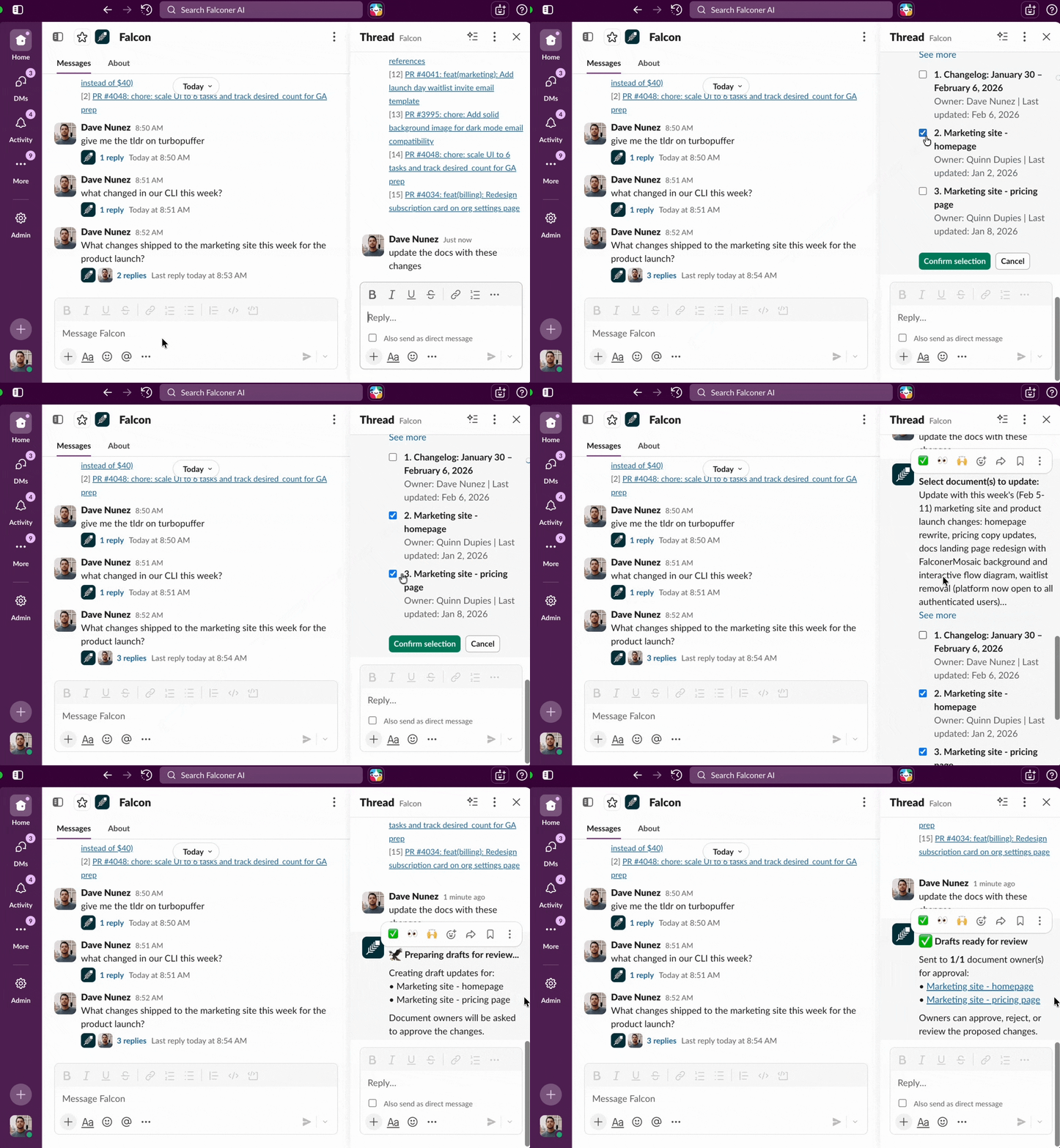
To update a doc:
- Mention Falcon with your update request. For example:
@Falcon update the runbook with the new staging deploy steps- Falcon analyzes the conversation and searches for matching docs
- Falcon identifies the correct document(s)
- Confirm docs you want to update
Tips for better updates
Section titled “Tips for better updates”- Be specific in your request. Tell Falcon which doc to update and what information to add. The more context you provide, the more accurate the update.
- Reference the doc by name. If you know the document title, include it in your message to skip the selection step.
- Use threads. Falcon reads the full thread context, so reply in a thread where the relevant discussion happened.
- Update tables from Slack. Falcon handles structured content like tables — mention the specific rows or columns to change.