Keep docs in sync with PRs
Get notified when pull requests impact your docs.
Falconer automatically detects when a merged pull request impacts your existing documentation and proposes targeted updates — delivered straight to document owners through Slack.
Note: Automatic doc updates is a new feature. Contact us at support@falconer.com for a demo.
Prerequisites
Section titled “Prerequisites”Before enabling automated documentation updates, make sure you have:
- Connected your GitHub App and Slack workspace to Falconer
- Been assigned as an owner of the documents you want to receive updates for
How it works
Section titled “How it works”When a PR merges, Falconer analyzes the code changes, identifies which documents are affected, drafts proposed updates, and notifies the right people. Owners can accept, review, or reject changes without leaving Slack.
flowchart LR
    PR([PR merges]) --> Notify[You get a Slack notification]
    Notify --> Accept[Accept]
    Notify --> Review[Review & edit]
    Notify --> Reject[Reject]
    Accept --> Done([Doc updated])
    Review --> Done
    Reject --> Skip([No changes])
Update notifications
Section titled “Update notifications”If a PR impacts a doc you own, you’ll receive a notification in Slack.
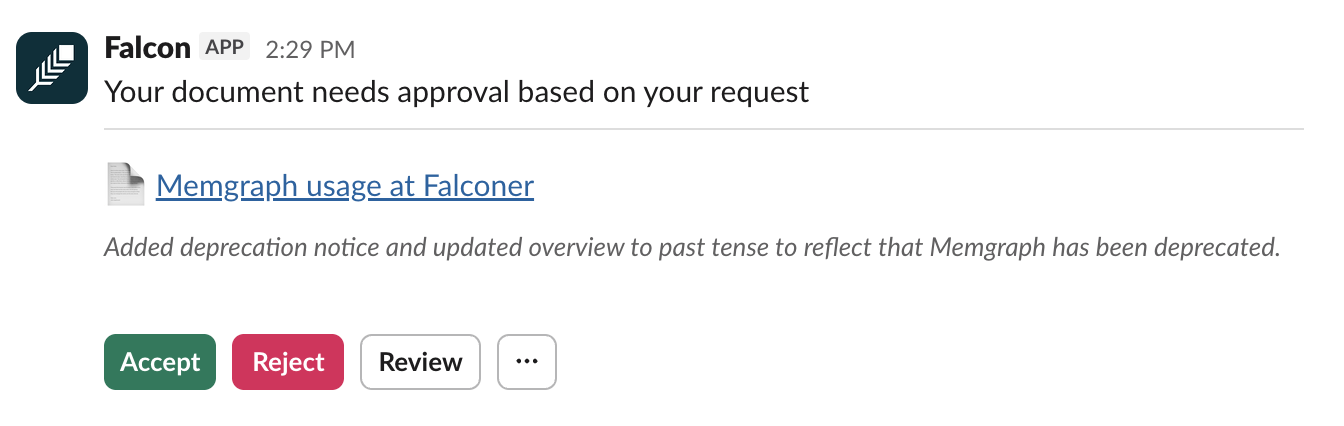
Accept — Changes apply immediately to the document.
Review — Opens the document in the Falconer editor with a side-by-side diff of the proposed changes. You can make manual edits before accepting or rejecting.
Reject — Discards the proposed changes entirely.