Falconer vs Notion: which is better in April 2026?
If you’re researching Falconer vs Notion, your team has probably hit the point where your knowledge base can’t keep pace with how fast you ship. Notion works great when you want a flexible place to write and organize, but it has no idea when your codebase changes. We built Falconer after realizing that documentation maintenance isn’t a people problem, it’s a system design problem. When your team merges twenty pull requests in a week, someone has to remember which docs need updates, find those docs, and rewrite them. Notion makes you own that work. Falconer detects the changes and handles it automatically, so your engineers can stay focused on building instead of babysitting a wiki.
TLDR:
- Notion requires manual updates, leading to stale docs within weeks of creation
- Falconer auto-updates documentation when code changes via GitHub, Slack, and Linear integration
- Total Search answers questions across your entire codebase and all your documents
- MCP integration feeds your coding agents accurate company context, not generic responses
- Falconer is a self-updating knowledge layer for engineering teams shipping daily
What is Notion?
Notion is a workspace tool that teams commonly reach for when they need documentation, wikis, notes, and project management in a single place. It gives you a flexible canvas for creating pages, databases, and nested organizational structures, which makes it appealing for teams that want to consolidate their writing and planning.
Where Notion puts its energy is in manual content creation and user-driven organization. You build the pages, you set up the hierarchy, you maintain the docs. That flexibility is a strength when your team is small and everyone remembers where things live. But as headcount grows and codebases get more complex, the burden of keeping everything organized and accurate falls squarely on the people doing the work. Notion assumes someone will write the doc, update the doc, and remember where the doc lives. That assumption tends to break right when you need it most.
What is Falconer?
Falconer is an AI-powered knowledge management system we built to solve the problem most teams quietly accept: documentation that goes stale the moment it’s written. Instead of relying on humans to maintain every page, Falconer connects to the tools your team already uses (GitHub, Slack, Linear, Granola, docs, and more) and builds a self-updating knowledge layer from those sources.
When code changes, docs get flagged and updated automatically. When decisions happen in Slack threads, that context gets captured before it disappears into the void. The result is a knowledge graph that stays current as your codebase evolves, without requiring someone to babysit it.
Think of it as shared memory for your team and agents. It’s always accurate, always searchable, and always available where work actually happens, whether that’s in your editor, your IDE, or a Slack channel.
Documentation maintenance
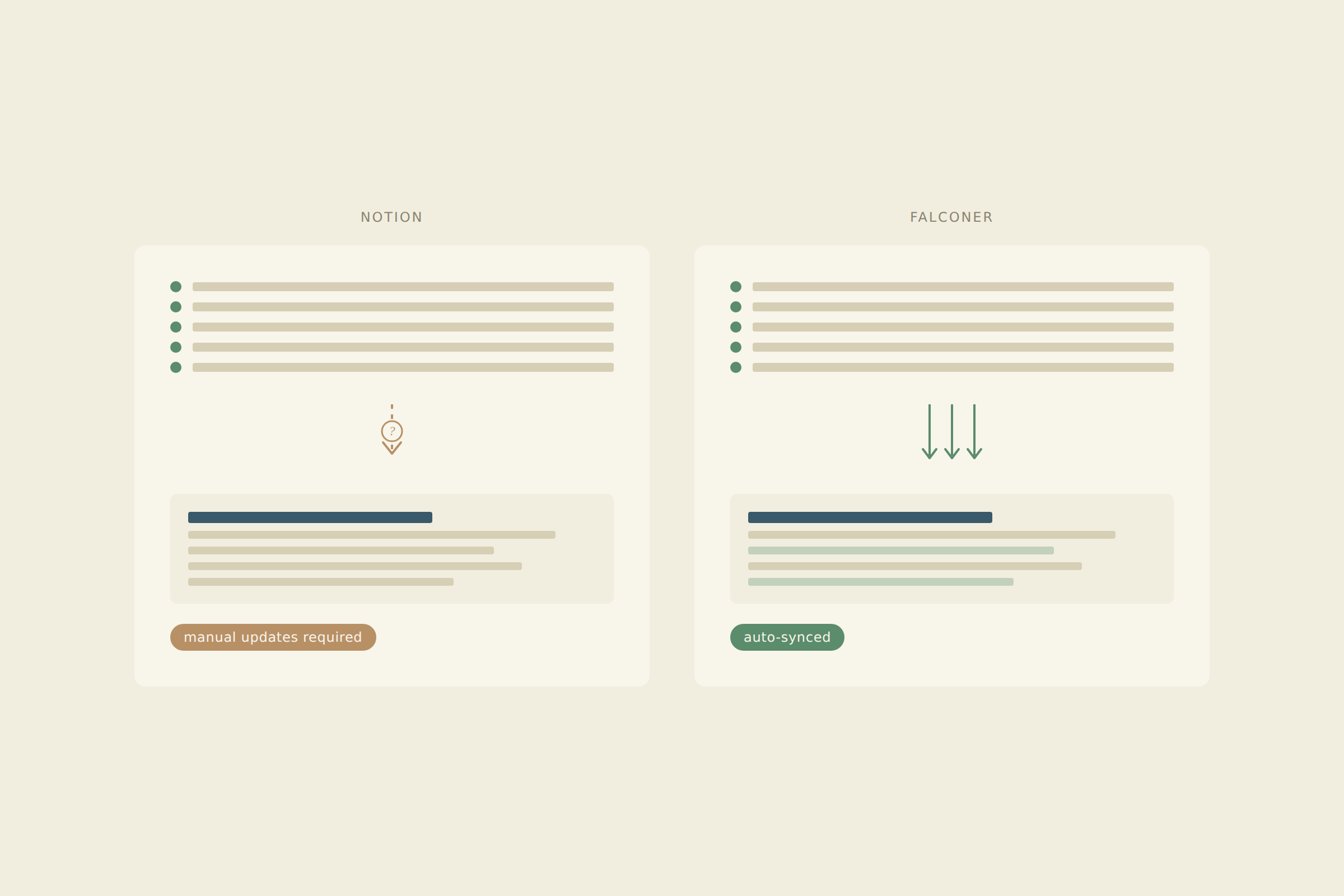
The biggest gap between Falconer and Notion shows up in what happens after a document is published. According to FastDoc’s State of Software Documentation 2026 report, the majority of internal engineering docs become outdated within weeks of creation. Both tools have to contend with that reality, but they approach it very differently.
How Notion handles maintenance
Notion treats documentation as a finished artifact. Once you write a page, it sits there until someone decides to update it. There’s no mechanism to detect that a feature has changed, a PR has merged, or an API endpoint has been deprecated. If your team ships fast, your Notion wiki quietly falls behind. The docs look fine on the surface. They just stop reflecting what’s actually true in the codebase.
For teams with stable, slow-moving documentation needs, this can be manageable. For engineering orgs shipping daily? It’s a recipe for silent drift.
How Falconer handles maintenance
We built Falconer to treat documentation as a living system. When a pull request merges, Falconer detects affected docs and proposes updates grounded in the actual code changes. Slack conversations with decisions get surfaced before they scroll into oblivion.
No one has to remember which page to update. No one has to audit the wiki hoping to catch stale docs. The system monitors changes and does the heavy lifting, so your engineers can stay focused on building.
If documentation decays the moment it’s written, the only durable fix is a system that maintains itself.
| Feature | Falconer | Notion |
|---|---|---|
| Maintenance approach | Auto-updates documentation when code changes via GitHub integration. Detects affected docs and proposes updates grounded in actual pull requests and Slack decisions. | Manual updates required. Pages remain static until someone remembers to update them. No detection mechanism for code changes or deprecated features. |
| Knowledge management | Self-updating knowledge graph that monitors codebase changes and captures decisions from Slack threads before they disappear. Treats documentation as a living system. | Treats documentation as finished artifacts. Flexible organizational structure with databases and nested pages, but content falls behind as teams ship faster. |
| Search capabilities | Total Search returns direct answers pulled from codebase, documents, and tasks simultaneously. Connects GitHub commits, Slack decisions, and Linear tickets into coherent responses. | Returns list of pages matching query terms. No codebase awareness or relationship mapping between docs, code, and tickets. Requires manual review of multiple results. |
| AI integration | AI grounded in actual codebase, pull requests, and internal decisions. MCP integration feeds coding agents like Claude Code and Cursor with company-specific context. | AI features draw from general internet knowledge. Cannot reference specific architecture or codebase. No integration path for feeding context into coding assistants. |
| Workflow integration | Connects to GitHub, Slack, Linear, Granola, docs, and more. Makes knowledge available whether engineers work through IDE integration or Slack. Acts as invisible context layer with a docs + agent UI. | Works as a destination workspace. Integrations mostly pull external content into Notion pages through embeds. Requires leaving current workflow to access information. |
Knowledge search and retrieval
Finding the right answer fast is where search stops being a convenience and becomes a productivity lever. According to Brightspot, poor knowledge management is one of the key drags on developer productivity and cost control. How a tool handles search shapes how much time your engineers spend hunting versus building.
How Notion handles search
Notion returns a list of pages matching your query. If you know exactly which doc you need, that works fine. But when the answer lives across three nested databases, a half-finished spec, and a page someone forgot to title, you’re left clicking through results and stitching the picture together yourself. Notion’s search has no awareness of your codebase, your tickets, or how those relate to the docs it surfaces.
How Falconer handles search
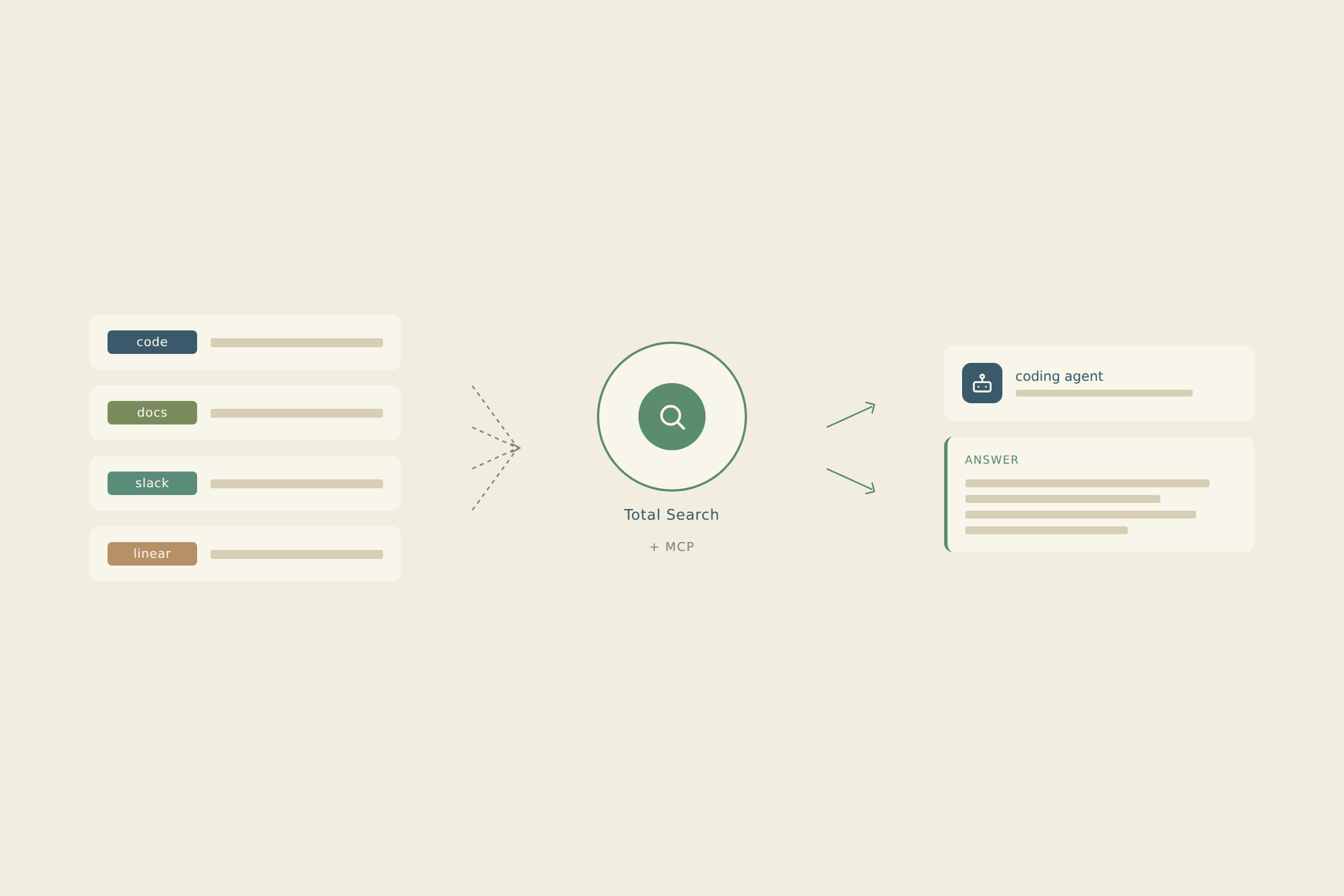
Falconer’s Total Search works differently. Instead of handing you links to sort through, it returns direct answers pulled from your codebase, documents, and tasks simultaneously. The system connects a GitHub commit, a Slack decision, and a Linear ticket to give you a single coherent response. It can answer questions no individual could answer alone, because it understands the relationships between millions of lines of code and the documentation surrounding them.
AI context and coding agent support
As engineering teams build workflows around AI coding assistants, the quality of context feeding those agents matters enormously. According to The Pragmatic Engineer’s 2026 AI tooling survey, teams adopting AI coding tools report that output quality depends heavily on the specificity of context provided. Qodo’s roundup of top AI coding assistants echoes the same finding: generic context produces generic results.
How Notion handles AI context
Notion’s AI features can generate and edit content, but they draw from general internet knowledge. Ask it about your authentication flow, and you’ll get a textbook answer instead of one grounded in your actual architecture. There’s no integration path to feed Notion’s context into tools like Cursor or Claude Code, so engineers end up manually copying snippets into prompts.
How Falconer handles AI context
Falconer’s AI is grounded in your codebase, docs, and decisions. Through MCP integration with Claude Code, Cursor, and similar tools, it automatically supplies coding agents with accurate, company-specific context. When an engineer asks how a feature works, Falconer traces code and links to the exact PR where it changed. Your AI tools get smarter because the context layer underneath them actually knows your systems.
Integration and information architecture
How your tools connect to the rest of your stack determines whether documentation helps or hinders flow. The split between Falconer and Notion here comes down to a simple question: does knowledge come to you, or do you go to it?
How Notion handles integrations
Notion works as a destination. You leave your IDE, open Notion, find the page, and hope it’s current. Integrations mostly pull external content into Notion pages through embeds or imports. The organizational flexibility is real: databases, nested pages, and linked views give you a powerful structure. But that structure lives in one place, and accessing it means breaking whatever flow you’re in.
How Falconer handles integrations
Falconer connects to GitHub, Slack, Linear, and more, then makes that knowledge available wherever engineers already work. Answers surface in Slack threads, inside your IDE, and through the Falcon agent UI. You can import your existing Notion docs, and Falconer will flag gaps, identify stale pages, and propose a reorganized hierarchy through Organize mode. Knowledge follows the work instead of waiting for someone to come find it.
Why Falconer is the better choice
Notion is a solid pick for teams that want a flexible wiki alongside project management and don’t mind owning the upkeep. Its template ecosystem and familiar editing experience make it accessible, especially for non-technical collaborators.
Falconer is the stronger choice for engineering-led organizations where code moves faster than anyone can document. If your team ships daily and your docs can’t keep up, the auto-updating model closes that gap without adding maintenance work to someone’s plate. Codebase-aware AI and MCP integration with Claude Code and Cursor mean your agents actually understand your systems, not generic patterns.
For teams that want fewer Slack interruptions, fewer sync meetings, and more time spent on hard problems, Falconer delivers knowledge that maintains itself. You write less, search less, and stay in flow longer. That’s the tradeoff worth making.
Final thoughts on keeping documentation current
The question isn’t whether Falconer or Notion has better features. It’s whether you want to spend engineering time maintaining docs or building product. Notion assumes someone will update the wiki, remember where things live, and keep it all accurate as your codebase evolves. That works until your team hits a dozen people and suddenly no one knows which pages are trustworthy anymore. We built Falconer because knowledge should follow the work, not wait for someone to document it. Get started with Falconer and stop treating documentation like a chore someone will eventually get to.
FAQ
How do I decide if Falconer or Notion is the right fit for my team?
Consider how fast your codebase changes and who maintains your docs. If your team ships daily and documentation falls out of sync within weeks, Falconer’s auto-updating model will save you time. If you need a flexible wiki for stable content and don’t mind manual updates, Notion works well.
What’s the main difference between how Falconer and Notion handle documentation after it’s published?
Notion treats docs as finished artifacts that sit unchanged until someone manually updates them. Falconer monitors your codebase and automatically flags outdated docs when code changes, proposing updates grounded in actual pull requests and Slack decisions.
Who is Notion best suited for versus Falconer?
Notion works well for teams with stable documentation needs, slower release cycles, and people willing to own ongoing maintenance. Falconer is built for engineering-led organizations where code moves faster than anyone can document, and where keeping context current matters more than building nested page hierarchies.
Can I migrate my existing Notion docs into Falconer?
Yes, Falconer ingests your existing Notion content alongside GitHub, Slack, Linear, and other sources. Once imported, it will flag stale pages, identify gaps, and propose a reorganized structure through Organize mode while keeping everything searchable across your entire knowledge base.
How does Falconer’s AI differ from Notion’s AI features when answering technical questions?
Notion’s AI draws from general internet knowledge and can’t reference your specific architecture or codebase. Falconer’s AI is grounded in your actual code, pull requests, and internal decisions, so it returns answers specific to how your systems work instead of textbook explanations.
Ready to get started?
Create an account and start building your knowledge base — no contracts or credit card required. Or, contact us to design a custom package for your team.

Ready to get started?
Create an account and start building your knowledge base — no contracts or credit card required. Or, contact us to design a custom package for your team.